




Part ofClaude AI Features: The Complete Overview
Claude for business, explained: real use cases, the Team and Enterprise plans, data-privacy and admin controls, a simple ROI framing, and where it fits vs ChatGPT.
In This Article
8 sectionsClaude for business means using Anthropic's AI assistant to run real company work — drafting, analysis, customer support, and coding — under a plan built for organizations. Teams of five or more use the Team plan at $25 per seat; larger companies use Enterprise with SSO and audit logs. Your data trains no models by default.
We run this site's entire content operation on Claude — drafting, editing, data pulls, and the code behind the CMS — so we've felt where it saves real hours and where it doesn't. This guide is the practical version of Claude for business: the work it actually does for a company, which plan to buy, how the privacy guarantees hold up, and how it stacks against ChatGPT.
What Claude for business actually covers
Claude for business isn't a separate product with its own SKU. It's the same Claude assistant most people know from claude.ai, pointed at company work and sold on plans built for organizations. Anthropic reports more than 300,000 business customers and roughly 70% of the Fortune 100 already using it, so the question is rarely can you use it — it's how to set it up so it pays off.
Three things separate business use from personal use. First, the plan: individuals buy Pro, but companies buy Team (five seats and up) or Enterprise. Second, the guarantees: Team and Enterprise contractually keep your conversations out of model training by default. Third, the controls: an admin console, single sign-on, and audit logging that a personal account never exposes. Our Claude AI features overview maps every capability underneath; this page is about applying them at work.
Claude for business use cases: where it earns its keep
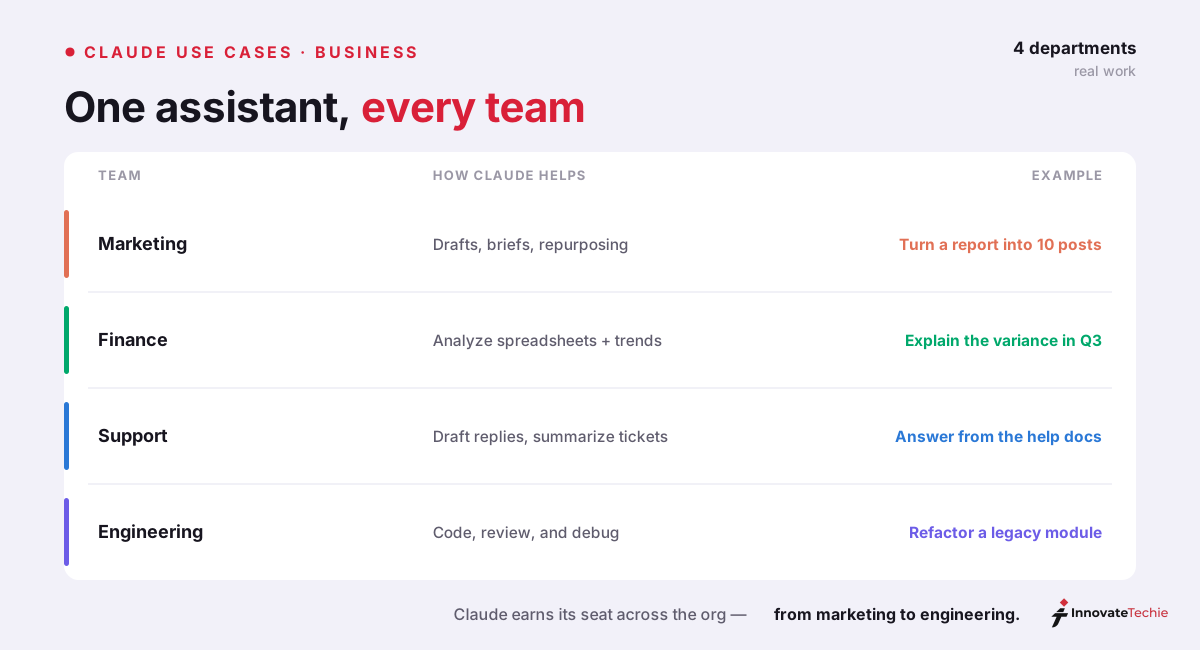
The fastest way to judge claude ai for business is to look at the jobs it already does well across a company. We've watched each of these land in real workflows — ours and clients'. The pattern holds: Claude is strongest wherever the input is language or data and the output is a draft a human reviews.
| Department | Claude business use case | What it produces |
|---|---|---|
| Marketing & comms | Drafting, editing, repurposing | Blog posts, emails, ad copy in your brand voice |
| Operations & finance | Document and data analysis | Summaries of contracts, reports, spreadsheets |
| Customer support | Draft replies, triage, macros | Suggested responses agents approve before sending |
| Engineering | Coding with Claude Code | Features, bug fixes, reviews across a codebase |
| Sales | Lead triage and research | Prioritized lists, account briefs, follow-up drafts |
| Knowledge work | Research and synthesis | Cited briefs from long documents and the web |
Two of these claude business use cases deserve a callout. For analysis, Claude reads a 200-page contract or a messy spreadsheet and returns a structured summary in seconds — the Claude for data analysis workflow we lean on for reporting. For engineering, Claude Code writes, reviews, and refactors across a whole repository, and with Claude Code Desktop even non-developers ship internal tools by describing them in plain English. The agentic side goes further: Claude Cowork takes a multi-step task end to end across your files while you approve each consequential step.
Claude for Small Business: agents inside your tools
Anthropic's Claude for Small Business release (launched May 13) turned claude for companies from a chat window into an operator. One toggle inside Claude Cowork connects Claude to the tools a small business already runs — QuickBooks, PayPal, HubSpot, Canva, Docusign, Google Workspace, and Microsoft 365 — with no IT project. From there you pick from ready-to-run workflows: payroll planning, month-end close, invoice chasing, lead triage, and contract review, among others.
The safety model is the important part. Claude reads, drafts, and prepares the work, then waits: it does not send, post, or pay until a human approves. That single design choice is what makes agents built on Claude's connectors safe to point at money and customers. You get the speed of automation without handing over the keys.
Which plan: Pro, Team, or Enterprise
Picking the plan is the one decision most companies get wrong, usually by buying five personal Pro accounts when Team is cheaper once you count the overhead. Here's the ladder for claude for work, from a solo founder to a regulated enterprise.
| Plan | Price | Built for | Key business features |
|---|---|---|---|
| Pro | $20/user/mo | Solo founders, tiny teams | Opus 4.8, Cowork, Claude Code, no admin |
| Team | $25/seat/mo ($20 annually) | Companies of 5+ | Central billing, SSO, shared Projects, no training |
| Max | $100–$200/mo | Individual power users | 5x–20x Pro usage, no team tools |
| Enterprise | Custom | Large / regulated orgs | SCIM, audit logs, data residency, ZDR |
For most companies the right Claude for business plan is Team. It needs a five-seat minimum, costs $25 per seat monthly or $20 billed annually, and adds the three things a business actually needs over a pile of Pro logins: one invoice, admin controls, and shared Claude Projects so everyone works from the same context. Our Claude Team plan guide breaks down Standard versus Premium seats; the full price ladder across every tier lives in how much does Claude cost.
Data privacy, security, and admin controls
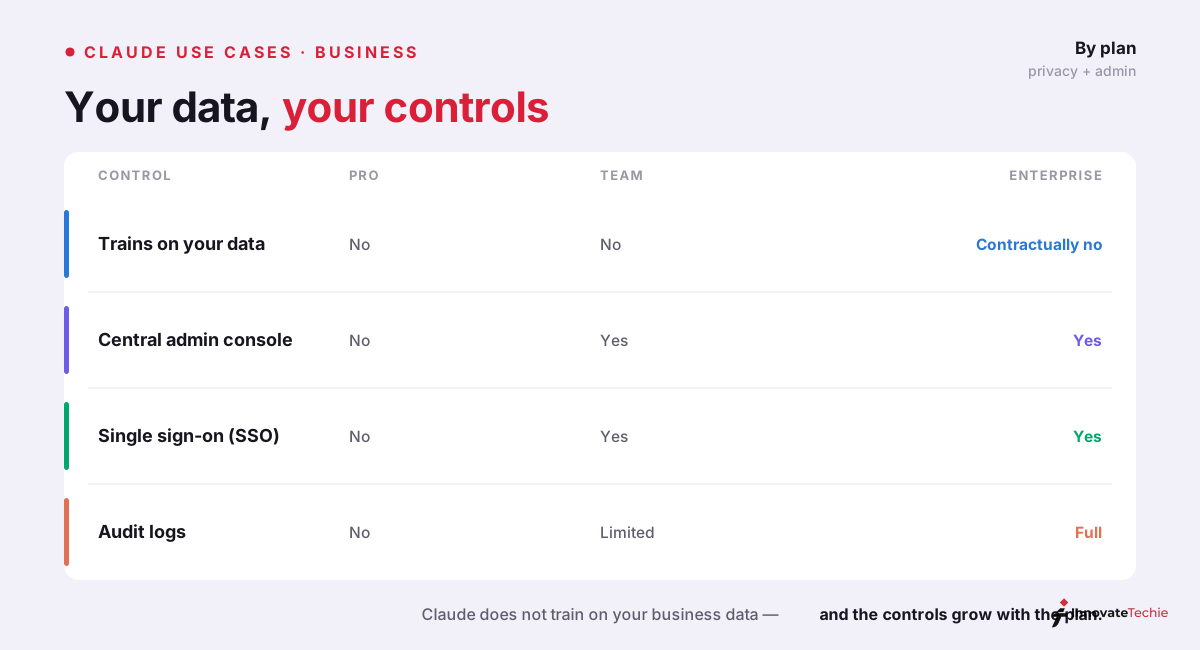
The first question every IT and legal team asks is whether employee use leaks data. The reassuring baseline: on Team and Enterprise, Anthropic does not train its models on your conversations or uploads by default — it's a contractual commitment, not a setting someone can forget to toggle. And Claude inherits your existing permissions, so it can't surface anything an employee couldn't already see.
Enterprise layers on the governance a security review demands. Anthropic's Enterprise plan documentation covers the full set: SSO and SCIM for identity, audit logging and a compliance API for oversight, data-residency options, and zero data retention for API usage. The table below is the shorthand we use when a client asks what changes as they climb the tiers.
| Control | Pro | Team | Enterprise |
|---|---|---|---|
| Training on your data | Off by default | Contractually off | Contractually off |
| Admin console & roles | No | Yes | Yes, with SCIM |
| Single sign-on (SSO) | No | Yes | Yes |
| Audit logs | No | Basic | Advanced + compliance API |
| Data residency / ZDR | No | No | Yes |
A simple ROI framing for Claude for business
ROI on claude ai for business is easier to estimate than most software, because the unit is hours. Take one number — the fully loaded hourly cost of the people using it — multiply by the hours Claude gives back, and compare it to $20–$25 a seat. In our own work, one editor reclaiming even two hours a week clears the seat cost many times over.
| Input | Example figure |
|---|---|
| Seat cost | $25 / seat / month |
| Loaded staff cost | $50 / hour |
| Hours saved / week | 3 |
| Value returned / month | ~$600 |
| Net gain per seat | ~$575 / month |
The math only works if adoption is real, which is why we tell teams to start narrow: pick one repetitive, language-heavy task per person — support replies, first-draft reports, code review — prove the hours, then widen. A seat that nobody opens is the only reliable way to lose this trade.
Where Claude fits versus ChatGPT for business
No honest business guide pretends one tool wins everything. We run both. For Claude for business, the edge is long documents, instruction-following, and professional writing — Claude holds a 200-page brief in context and follows a detailed style guide without drifting. ChatGPT's edge is image generation, a more polished voice mode, and a wider catalog of native integrations.
Most growing companies end up paying for both and routing work by strength: Claude for drafting, analysis, and code; ChatGPT where images or voice matter. Keep one hard limit in mind — Claude does not generate images, so any visual asset still needs a separate tool. We scored the full trade-off in is Claude better than ChatGPT.
The quick version:
- Claude drafts, analyzes, supports, and codes across teams
- It does not train on your business data
- Team and Enterprise add admin, SSO, and audit controls
- Start on Team at 5+ seats; Enterprise for large orgs
For example, a 30-person agency put Claude on Team at $25 a seat and measured about 6 hours saved per writer each week on first drafts and client email.
Claude pricing at a glance
| Plan | Price |
|---|---|
| Free | $0 |
| Pro | $20 / month |
| Max | from $100 / month |
| API | Pay per token |
For the full breakdown of every plan, see our how much Claude costs guide.
Frequently Asked Questions

Written by
InnovateTechie
Writing about Claude and the Anthropic toolkit — models, Claude Code, pricing, features, and fixes, in clear, practical, hands-on guides tested by daily use.
View all posts →