




Part ofClaude AI Features: The Complete Overview
Claude Projects group shared knowledge files, custom instructions, and chat history around one goal. How to set them up and when to use them.
In This Article
7 sectionsClaude Projects are persistent workspaces that bundle three things around one goal: a shared knowledge base of uploaded files, custom instructions Claude follows in every chat, and the grouped conversation history for that work. Free accounts get up to five projects; each holds a 200K-token knowledge base (roughly 500 pages), and paid plans scale it further with retrieval.
We run this whole site inside a handful of Claude Projects — one for editorial style, one per client, one for the codebase — and the payoff is identical every time: we stop re-explaining context. This guide covers what a project actually contains, how it differs from a plain chat and from memory, a five-minute setup walkthrough, adding project knowledge, team sharing, and the rule we use to decide when a project earns its place.
What are Claude Projects, exactly?
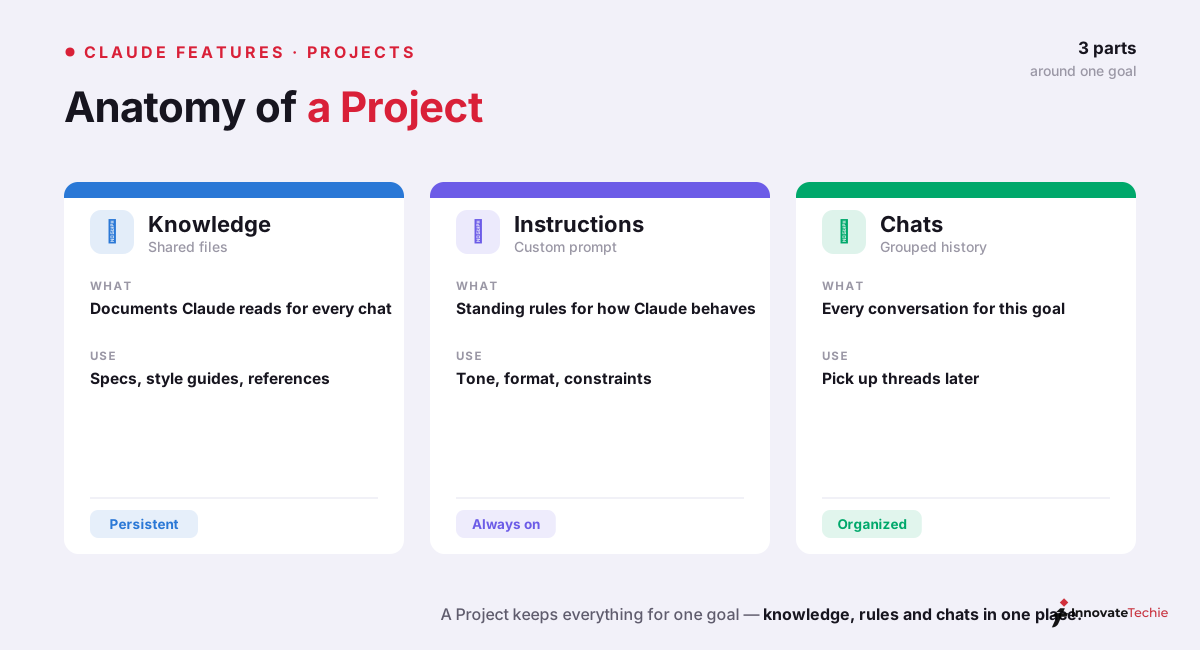
So what are Claude Projects? A project is a self-contained workspace built around one goal, and it holds three things a normal conversation throws away the moment you close the tab:
- Project knowledge — files you upload once (PDFs, docs, spreadsheets, style guides, code) that Claude can reference in every chat inside the project, without you re-attaching them.
- Custom instructions — a standing brief Claude follows across every conversation in the project: tone, format, role, constraints, the things you'd otherwise repeat at the top of each chat.
- Grouped chat history — every conversation you start inside the project stays together, so related threads live in one place instead of scattered across your global history.
Anthropic introduced Projects to give people a place to ground Claude's answers in a curated set of documents rather than a blank slate. The mental model that works for us: a regular chat is a sticky note, a project is a desk. The desk keeps your reference material, your standing instructions, and every note you've written on this task within arm's reach.
Claude Projects vs chat vs memory
The single most common confusion is Claude Projects vs chat vs memory — three features that all "remember" something, but at different scopes. A regular chat remembers only within that one conversation. A project remembers within one workstream. Memory remembers facts about you everywhere. Here is the split we actually use:
| Regular chat | Claude Projects | Claude memory | |
|---|---|---|---|
| Scope | One conversation | One project workspace | Every chat, everywhere |
| What it holds | The live transcript | Knowledge files + custom instructions + grouped chats | Extracted facts about you |
| Persistence | Gone when the chat ends | Persists in the project | Persists until you edit or reset it |
| You control it via | Starting a fresh chat | Project settings and files | Settings → Capabilities |
| Best for | A quick one-off question | Standing context for one body of work | "Know who I am everywhere" |
The rule of thumb: reach for a regular chat when the question is disposable, a project when Claude needs the same background every time, and Claude memory when the fact is about you and should follow you into every project. They compose cleanly — project files supply the "what," memory supplies the "how you like it." All three sit inside the wider Claude AI features set, and your memory even carries into agentic surfaces like Claude Cowork.
How to use Claude Projects: a five-minute setup
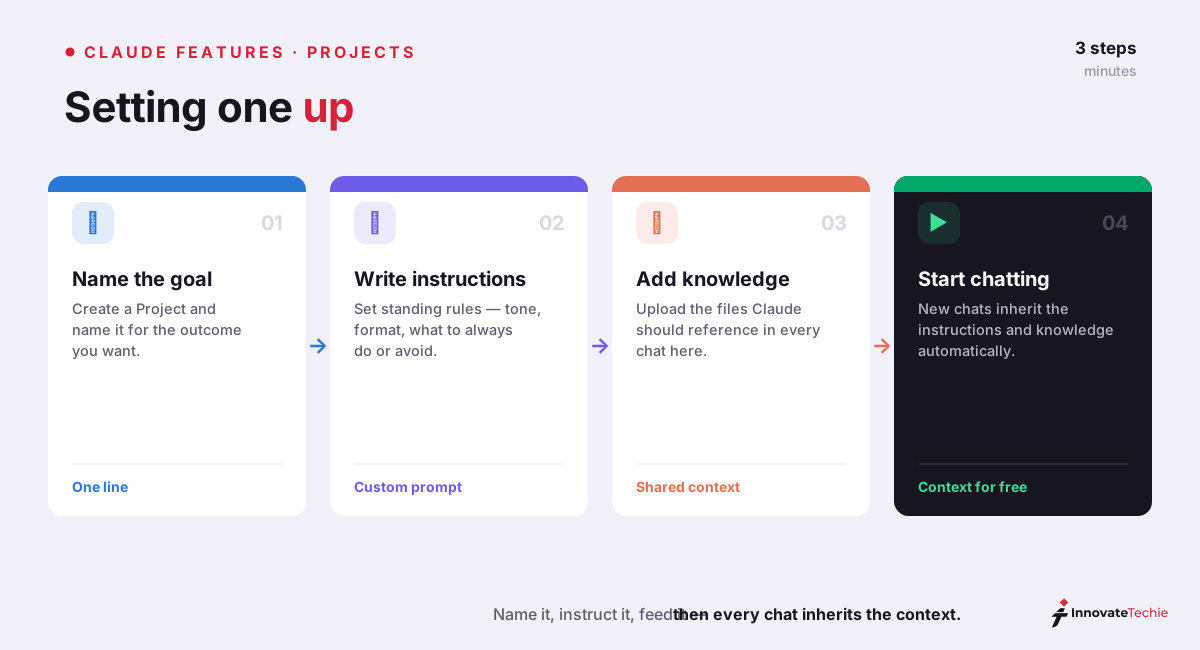
Here is how to use Claude Projects from scratch. The whole thing takes about five minutes, and you only do it once per workstream.
| Step | Where | What you do |
|---|---|---|
| 1. Create it | claude.ai/projects → + New Project | Name it after the goal ("Q3 Board Deck," "Acme Client," "API docs") |
| 2. Set the brief | Custom instructions field | Write who Claude is, the tone, and any hard rules for this work |
| 3. Add knowledge | Add content / upload | Drop in the reference files Claude should always have on hand |
| 4. Start working | New chat inside the project | Ask normally — every reply now draws on the knowledge and instructions |
A few things we learned the slow way. Name the project after the outcome, not the topic — "Rewrite onboarding emails" beats "Marketing," because a project with a sharp goal gets sharper instructions. And you don't have to load everything up front: projects are living workspaces, so add a document the first time you notice yourself pasting it into a chat.
Claude project knowledge: files, limits, and RAG
Claude project knowledge is the feature that makes a project more than a saved prompt. Each project ships with a 200K-token knowledge base — around 500 pages of text — and everything Claude reads there counts against that budget, exactly like the Claude context window inside a single chat. Anthropic's official Projects help article documents this limit and how it scales.
Here's the part people miss: on a paid plan, projects don't just stop at 200K. When your uploaded knowledge approaches that ceiling, Claude automatically switches on retrieval-augmented generation (RAG), which searches your files for the relevant passages instead of loading all of them at once. That expands effective capacity up to roughly 10x while keeping answers grounded. Free projects use the 200K window directly; paid projects get the RAG scaling on top.
| Capability | Free plan | Paid plans (Pro, Max, Team, Enterprise) |
|---|---|---|
| Number of projects | Up to 5 | Higher / effectively unlimited |
| Knowledge base window | 200K tokens (~500 pages) | 200K tokens, then RAG |
| Large knowledge scaling (RAG) | No | Yes — up to ~10x capacity |
| Team sharing | No | Team and Enterprise only |
For custom instructions, we treat the field like a system prompt you'd normally paste at the top of a chat: state Claude's role, the audience, the output format, and the two or three constraints that matter most. Keep it tight. A bloated instruction block competes with your actual question for attention, so we prune ours whenever it drifts past a screen.
Team Projects: sharing and permissions
On Team and Enterprise plans, a project stops being personal and becomes shared infrastructure. Click Share project, then add colleagues by name or email — or bulk-paste a list of addresses — and everyone works from the same knowledge base and instructions instead of forwarding files around.
Sharing comes with two permission levels, and picking the right one matters:
- Can use — the member can open the project, read its knowledge, and chat, but can't change the setup. This is the default for most of a team.
- Can edit — the member can modify custom instructions, add or remove knowledge, and manage who else has access. Reserve it for the few people who own the project.
You can also publish a project to the whole organization, and access is revocable at any time. In practice, shared Team Projects are how a group standardizes voice: one person builds the brand-voice project, everyone drafts inside it, and the output stops sounding like six different writers.
When to use a Claude Project instead of a chat
The decision is quick once you've felt it a few times. Use a Claude Project when either of these is true: you'll revisit this work more than once, or Claude needs background context to answer well. If both are false, a regular chat is faster and less overhead.
Concrete signals we start a project:
- We've pasted the same document or instructions into three separate chats.
- The work spans days or weeks — a client, a manuscript, a course, a codebase.
- Answers keep coming back generic because Claude lacks the source material.
- A team needs Claude to give everyone the same grounded answers.
And the counter-signal: a genuinely one-off question — a quick rewrite, a definition, a throwaway calculation — belongs in a plain chat. Projects reward repetition; there's no point scaffolding a workspace you'll never open twice. When you do find yourself living in a project, it slots into the broader Claude AI features toolkit alongside memory and skills, each covering a different slice of "remember this for me."
For example, we keep one Claude Project per client with their brand guide and past briefs as knowledge — every new chat writes in their voice without a single reminder.
According to Anthropic's documentation, Projects are available on paid plans and currently support both individual and Team workspaces running Sonnet 4.6 and Opus 4.8.
Claude pricing at a glance
| Plan | Price |
|---|---|
| Free | $0 |
| Pro | $20 / month |
| Max | from $100 / month |
| API | Pay per token |
For the full breakdown of every plan, see our how much Claude costs guide.
Frequently Asked Questions

Written by
InnovateTechie
Writing about Claude and the Anthropic toolkit — models, Claude Code, pricing, features, and fixes, in clear, practical, hands-on guides tested by daily use.
View all posts →