




Part ofClaude AI Features: The Complete Overview
Claude memory remembers durable facts across chats and reuses them automatically. How it works, how it differs from context, and how to control it.
In This Article
7 sectionsClaude memory is a running summary of facts about you — your role, preferences, and ongoing projects — that Claude synthesizes from past conversations and reuses automatically in new chats when the feature is turned on. It stores extracted facts, not full transcripts, and every entry is viewable, editable, and deletable in Settings.
We have run this site through Claude every day for over a year, and switching memory on changed the first thirty seconds of every session: no more re-explaining who we are, what the project is, or how we like answers formatted. Below we cover exactly what memory keeps, how it differs from the context window and Projects, how to control or wipe it, how memory works in Claude Code, and what happens to your data.
How does Claude memory work?
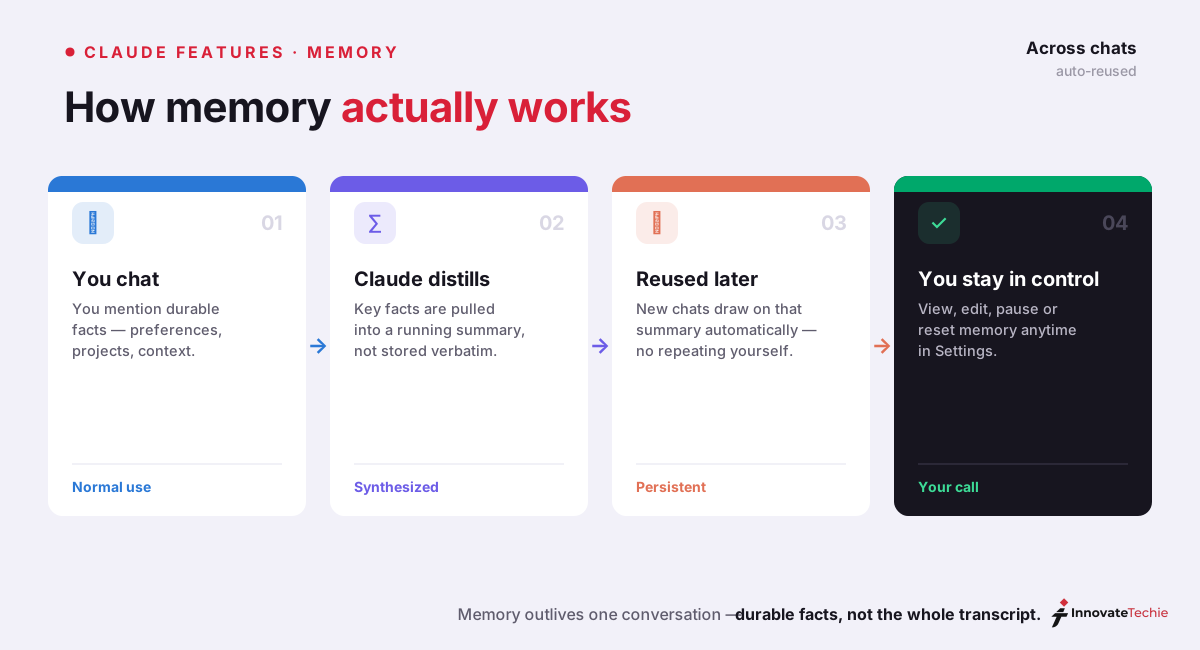
When memory is on, Claude notices durable facts worth keeping — a stated preference, a work fact, your communication style — and folds them into a synthesized summary of your chat history rather than storing whole conversations. That summary refreshes roughly every 24 hours and gets applied automatically the next time you open a new chat, so you build on prior context without repeating yourself.
The important nuance: Claude does not replay transcripts word for word. What it keeps are extracted entries that read like short notes — "User prefers concise, bullet-point answers" or "User works in B2B SaaS marketing." That is why the Claude memory feature feels like Claude "knowing" you rather than searching a log.
This is also where people conflate two separate features. Memory is a running summary applied automatically. "Search past chats" is a different, on-demand tool that retrieves the actual content of specific earlier conversations only when you ask for it. Anthropic's official chat search and memory guide draws the line the same way: memory remembers facts, search retrieves conversations. You use memory passively and reach for search when you need to pull a detail from one particular thread.
Claude memory vs the context window and Projects
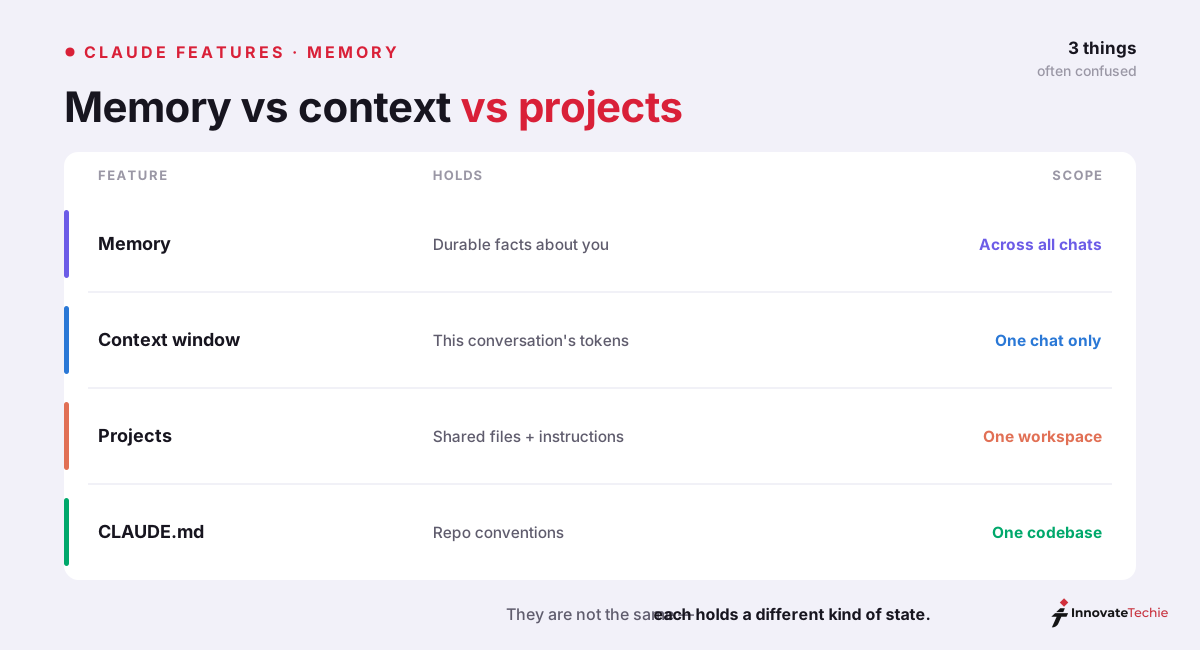
Three Claude features carry context, and mixing them up leads to the wrong tool for the job. The context window is Claude's working memory within a single conversation — the transcript, your files, and tool output the model rereads on every turn. Memory works across conversations. Projects scope context to one workstream. Here is the split we actually use:
| Claude memory | Context window | Projects | |
|---|---|---|---|
| Scope | Every chat, everywhere | One conversation | One project workspace |
| What it holds | Extracted facts and preferences | The live transcript, files, tool output | Knowledge files plus custom instructions |
| Persistence | Persists until you edit or reset it | Cleared when the conversation ends | Persists inside that project |
| You control it via | Settings → Capabilities | Starting a fresh chat / compaction | Project settings and files |
| Best for | "Know who I am everywhere" | "Reason over what's in front of you now" | "Standing context for one project" |
So how does Claude remember context across separate chats? Not through the context window — that resets every time a conversation ends, which is the Claude context window behavior we cover in its own guide. Memory is the layer that survives. This is the crux of how Claude AI memory differs: the window is finite and per-conversation, while memory is a small, durable summary that rides along on top of every new window.
Projects sit in between. A Project pins knowledge files and custom instructions to one body of work, and memory layers your personal, cross-project preferences over that. The two compose cleanly — Project files supply the "what," memory supplies the "how you like it." Memory also follows you into agentic surfaces like Claude Cowork, so your preferences carry into task work, not just chat. All of this fits inside the wider Claude AI features set.
What Claude memory stores (and what it doesn't)
Memory is deliberately narrow. It captures extracted facts and preferences — your role and industry, the output types you typically need, formatting preferences you have stated, ongoing project names, and field-specific terminology you use. It does not store documents, datasets, or entire conversations. If you need Claude to reference a file, that belongs in a Project, not in memory.
Knowing the boundary is what stops people from being disappointed by it:
| Claude memory is good for | Not the right tool for |
|---|---|
| Your role, industry, and audience | Storing documents or data (use Projects) |
| Tone and formatting preferences | Verbatim recall of one chat (use search past chats) |
| Ongoing project names and goals | Live data from other apps (use Connectors) |
| Terminology and conventions you use | Secrets or credentials you would rather not retain |
Treat memory as a profile, not a filing cabinet. The best entries are stable facts that change how Claude responds every time; anything that is really a document, a one-off, or sensitive data belongs somewhere else.
How to view, pause, and clear Claude memory
Everything lives under Settings → Capabilities. Click View and edit memory to open the Manage memory modal, which lists every stored entry so you can correct a fact Claude got wrong, delete individual items, or wipe the lot. You do not have to use the modal, either — you can just tell Claude in chat, "Please forget that I mentioned my location," and it confirms the deletion.
Two controls people confuse, because the difference matters:
| Action | Where | What it does |
|---|---|---|
| View and edit entries | Settings → Capabilities → View and edit memory | Opens the Manage memory modal; edit or delete individual entries |
| Pause memory | Settings → Capabilities → Memory toggle | Keeps existing memories but stops creating or referencing new ones |
| Reset memory | Settings → Capabilities → Reset memory | Permanently deletes everything, including project memories — cannot be undone |
| Forget one thing | Ask in chat: "Forget that I mentioned X" | Claude confirms and removes that detail |
| No memory at all | Start an incognito chat (the ghost icon) | Nothing is saved to memory or your history |
The trap to avoid: turning memory off does not erase what is already stored. Pausing freezes it, and the fastest way to clear it entirely is Reset — which is irreversible, so export or note anything you want to keep first. For a temporary blank slate on a single chat, an incognito conversation leaves no trace at all.
Claude memory in Claude Code: CLAUDE.md and auto memory
Here is the distinction developers ask about most. The claude.ai memory feature does not apply to the API — API calls are stateless and carry no persistent memory layer, so anything you want remembered has to be passed in every request. Claude Code is different again: it runs its own two separate memory systems, both loaded at the start of every session.
The first is CLAUDE.md — a plain Markdown file you write to give Claude persistent project instructions: build commands, conventions, architecture. The second is auto memory, notes Claude writes itself about your corrections and preferences, stored per repository under ~/.claude/projects/<project>/memory/, with the first 200 lines of its MEMORY.md index loaded each session. The official Claude Code memory documentation covers both, plus the /memory command to browse and edit them. Note that Claude Code requires a paid plan or API credits, whereas the claude.ai memory feature does not.
The mental model that keeps these straight: claude.ai memory is about you and follows you everywhere; CLAUDE.md is about a project and lives in that repo; auto memory is Claude's own scratchpad for one codebase. If you are setting up the developer side, our What Is Claude Code? guide walks through CLAUDE.md from scratch.
Is Claude memory private and safe?
Your memories are private to your account and are not shared with other users; Anthropic staff access them only for safety and abuse review. That is the reassuring part. The caveat worth knowing: your conversation data may be used to train Claude unless you disable that in Data & Privacy Controls, and policy-flagged chats can be retained for up to two years even so.
Our practical advice is simple. Skim your memory list every few weeks the way you would review app permissions — delete anything stale or too specific, keep sensitive details out of memory entirely, and reach for an incognito chat when you want a conversation that never touches your profile. Memory is a convenience you stay in charge of, not a black box.
The quick version:
- Memory holds durable facts, not whole transcripts
- It works across chats; the context window is one chat
- View, edit, pause or reset it in Settings
- Projects and CLAUDE.md are separate kinds of memory
According to Anthropic's documentation, memory is opt-in and fully editable in Settings, and it currently works across the Claude apps running Sonnet 4.6 and Opus 4.8.
Claude pricing at a glance
| Plan | Price |
|---|---|
| Free | $0 |
| Pro | $20 / month |
| Max | from $100 / month |
| API | Pay per token |
For the full breakdown of every plan, see our how much Claude costs guide.
Frequently Asked Questions

Written by
InnovateTechie
Writing about Claude and the Anthropic toolkit — models, Claude Code, pricing, features, and fixes, in clear, practical, hands-on guides tested by daily use.
View all posts →