




Part ofClaude AI Features: The Complete Overview
How to use Claude for SEO: cluster keywords, build topical maps and briefs, draft and optimize content, and generate schema — a practitioner playbook.
In This Article
9 sectionsHow to use Claude for SEO comes down to one rule: feed it your own data. Claude clusters keywords from Ahrefs or Google Search Console exports, builds topical maps, writes briefs, drafts and optimizes long-form content, and generates schema, titles, and meta descriptions. It cannot pull live rankings or search volumes, so it reasons from what you supply.
We run search for this site, and we've folded Claude into nearly every step of the process — from the first keyword export to the final internal-link pass. This is the playbook we actually use: the tasks we hand off, the prompts behind them, and the two places where Claude will quietly mislead you if you let it. SEO is only one slice of what the assistant does; Claude AI Features maps the rest of the surface.
How to use Claude for SEO: the end-to-end workflow
Every task below shares the same shape — you bring the data, Claude brings the reasoning and the drafting. The single biggest mistake we see is asking Claude for search volumes or "the current top 10." It has a knowledge cutoff and no live index, so it will invent plausible numbers to be helpful. Paste real exports instead, and its output turns from guesswork into analysis.
| SEO task | What to feed Claude | What you get back | What to verify |
|---|---|---|---|
| Keyword clustering | A keyword export (CSV) from Ahrefs, Semrush, or GSC | Clusters grouped by search intent | Clusters match real SERP intent |
| Topical map | Your niche plus the seed clusters | A hub-and-spoke content map | Coverage gaps versus competitors |
| Content brief | Target keyword plus top-ranking URLs you paste | Outline, entities, questions, word target | Any cited stats and facts |
| Draft and optimize | The brief plus your brand-voice notes | A full long-form draft | Originality, claims, tone |
| Titles and meta | A page-URL list with current titles | Title tags and meta descriptions | Character limits, duplication |
| Technical audit | Rendered HTML or a crawl export | Schema, hreflang, fixes, regex | Valid JSON-LD, correct rules |
| Internal links | A list of your URLs and target anchors | A prioritized link plan | Relevance and anchor variety |
Read that "What to verify" column as the non-negotiable part: Claude speeds the work, it doesn't absolve you of checking it.
Keyword clustering and topical maps from your exports
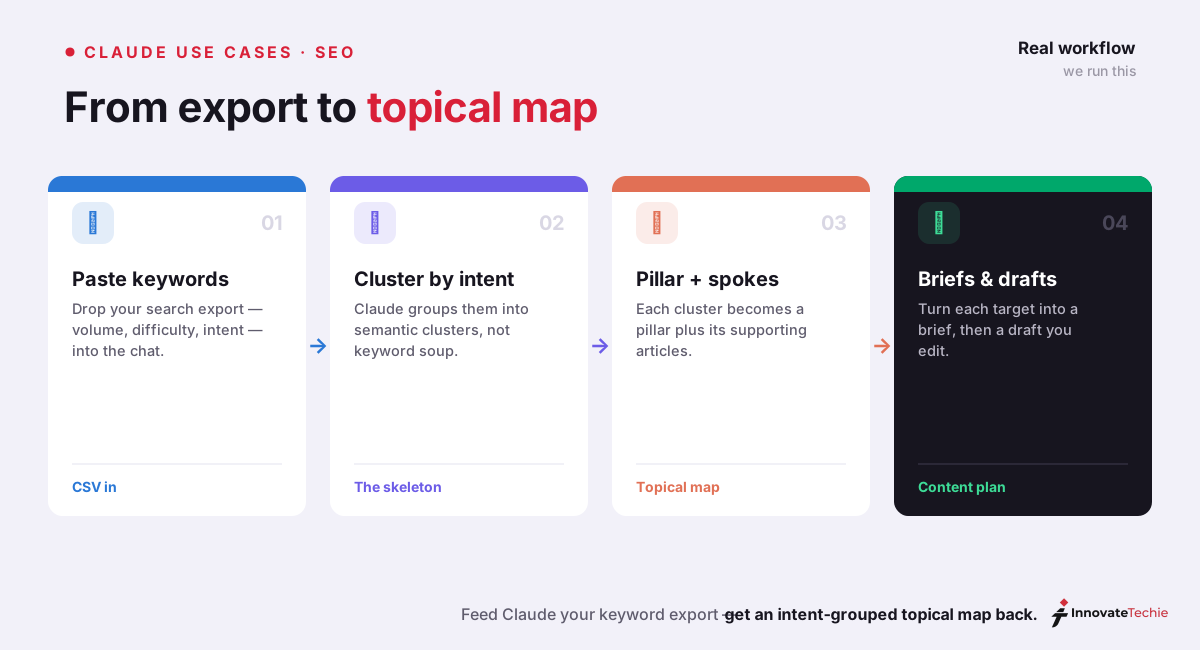
This is where using Claude for keyword research pays off fastest. Export a few thousand rows from your tool of choice, paste or upload the CSV, and ask Claude to group them by search intent rather than by string similarity. It reads "cheap running shoes" and "best budget trainers" as the same commercial intent even though they share no words — the exact judgment a spreadsheet formula can't make.
The prompt we lean on: "Here is a CSV of 900 keywords with volume and difficulty. Group them into topic clusters by search intent, label each cluster informational, commercial, or transactional, and flag the strongest pillar candidate in each." From those clusters, a second pass builds the topical map: "Turn these clusters into a hub-and-spoke plan — one pillar page per hub, supporting articles per spoke, with the internal-linking direction noted."
Claude reads a CSV natively, but for heavier slicing — pivoting by intent, deduping variants, scoring clusters — we sometimes move the same data into a spreadsheet and work it with Claude in Excel, which cites the exact cells it used. Either way, the volumes and difficulty scores come from your tool, never from Claude's memory.
Briefs and drafting: where Claude SEO content actually shines
Once the map exists, briefs become an assembly line. Paste the top three to five ranking URLs for a target term, and Claude will reverse-engineer a brief: the H2/H3 outline, the entities and subtopics every competitor covers, the questions buried in People Also Ask, and a realistic word target. We still add the angle and the first-hand experience ourselves — that's the part no model can fake, and the part search engines increasingly reward.
Drafting is Claude's strongest SEO muscle. In our testing it holds tone and hits keyword targets across 2,000-plus words without the robotic repetition that makes AI content easy to spot. Its natural long-form voice is the clearest edge it has over the alternatives; we scored that head-to-head in Is Claude Better Than ChatGPT?. Feed it the brief plus a short brand-voice note, ask for a draft, then iterate section by section rather than regenerating the whole thing.
For a folder of briefs and exports, you can go one level more agentic: point Claude Cowork at the directory and let it work through drafts, outlines, and revisions as a batch while you supervise — Claude as a junior on the content team rather than a chat window.
Titles, meta, and on-page optimization at scale
Generating meta is the highest-impact, lowest-risk task on this list. Hand Claude a list of URLs with their current titles and ask for rewrites under the character limits, and it will produce dozens in one pass. The prompt matters: constrain it hard, or it drifts long and vague.
| SEO job | Copy-ready prompt pattern |
|---|---|
| Cluster keywords | "Group this keyword CSV into clusters by search intent; label intent and flag the pillar candidate." |
| Build a brief | "Act as an SEO editor. From these five ranking URLs, write a brief for '': outline, entities, PAA questions, word target." |
| Write meta | "Write 3 title tags at 60 characters or fewer and 3 meta descriptions at 150-160 characters. Active voice, primary keyword once, no dates." |
| Schema markup | "Generate valid Article JSON-LD for this page, plus FAQPage schema from the H3 questions below." |
Two guardrails we always add: state the exact character budget (it respects "60 characters or fewer" far better than "keep it short"), and tell it to include the keyword once rather than stuff it. Claude's instinct is to over-optimize, and a one-line constraint fixes that.
Technical SEO: schema, audits, and internal-link planning
For technical SEO, Claude behaves less like a writer and more like an engineer who's read the spec. Paste a page's rendered HTML and it will flag missing canonical tags, thin heading structure, images without alt text, and orphaned metadata. Ask for schema and it returns clean, valid JSON-LD — Article, FAQPage, Product, BreadcrumbList — plus hreflang blocks and the regex you need for a bulk URL rewrite. It's good at the fiddly, syntax-heavy work that eats an afternoon.
Internal-link planning is the underrated one. Give Claude a list of your published URLs and target keywords and ask for a prioritized plan: which post links to which pillar, with varied anchor text and no over-linking to one page. It reasons about topical relevance in a way a "related posts" widget can't.
To turn this into a command center, developers connect Claude Code to their SEO stack through MCP, the open protocol Anthropic released so an agent can reach a crawler, a rank tracker, or an analytics API directly. With those connected, Claude Code can research a term, check a competitor, and return a prioritized page plan without you copy-pasting between tabs. Claude Code itself needs a paid plan or API credits to run.
What Claude is good and bad at for SEO
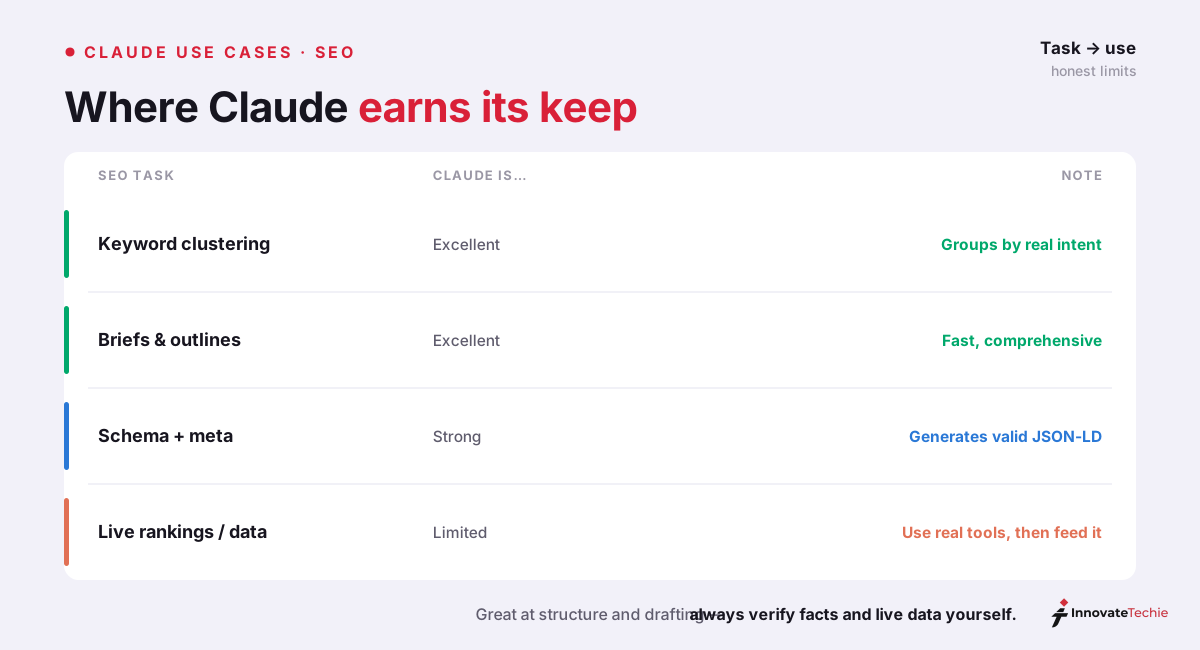
The honest version of how to use Claude for SEO is to treat it as a sharp analyst with no internet access rather than an all-in-one SEO platform. Play to that and it's transformative; forget it and you'll ship confidently wrong numbers.
| Claude is strong at | Claude is weak at |
|---|---|
| Clustering and intent-mapping pasted keyword data | Pulling live search volumes or rankings |
| Long-form drafts that read naturally past 2,000 words | Knowing today's SERP or trending topics |
| Briefs, outlines, and full entity coverage | Real competitive backlink data |
| JSON-LD schema, hreflang, regex, HTML audits | Strategy and prioritization calls |
| Rewriting for tone and keyword integration | Inventing metrics — it will, if you let it |
That last cell is the one to internalize. Claude does not know it's guessing, so the discipline is always the same: bring the data, and make it reason from your numbers instead of its training. This is also why a Claude AI SEO tool workflow never fully replaces your rank tracker, crawler, or backlink index — it sits on top of them.
Building repeatable SEO workflows with Skills
The most durable way to learn how to use Claude for SEO at scale is to stop re-typing prompts. Package a repeatable task — the brief format, the meta rules, the schema template — as a reusable Claude Skill, and Claude loads those instructions automatically whenever the task comes up. Our brief-writing skill encodes the exact outline structure, entity checklist, and tone we want, so every brief comes out identical without us restating the rules. If you build software workflows too, Claude Code Skills covers the folder format in depth.
Which plan and model for SEO work
Which model you run is a real lever, and it changes output quality more than most people expect. Claude Opus 4.8 is the deep-reasoning flagship — worth it for gnarly technical audits and strategy-shaped briefs. Claude Sonnet 5 is the fast default for bulk drafting and meta. The full trade-off, with cost math, is in Claude Models Explained.
| Your situation | Plan | Model to lean on |
|---|---|---|
| Occasional meta and quick rewrites | Free | Claude Sonnet |
| Freelancer or small agency, 10-15 articles a month | Pro ($20/mo) | Sonnet for drafts, Opus for audits |
| High-volume content team | Max ($100-$200/mo) | Opus 4.8 for hard reasoning |
| Programmatic or automated SEO | API | Sonnet 5 or Haiku 4.5 by cost |
On the API, the current per-million-token rates are Claude Opus 4.8 at $5/$25, Claude Sonnet 5 at an introductory $2/$10, and Claude Haiku 4.5 at $1/$5, which is what makes large programmatic runs affordable if you route cheap tasks to the smaller model.
That's how to use Claude for SEO the way a practitioner does: your data and your tools do the measuring, Claude does the clustering, drafting, and syntax, and you keep the judgment. One caveat we'll repeat — Claude cannot generate images, so hero art and diagrams still need a separate tool. Everything else in the pipeline, it earns its seat on.
The quick version:
- Paste your keyword export straight into the chat
- Ask Claude to cluster by search intent, not string
- Turn each cluster into a pillar plus supporting posts
- Always verify live data and facts with real tools
For example, we fed Claude a 7,000-keyword export and it returned a clean 8-pillar topical map in one pass — the same clustering took us a full afternoon by hand.
Claude pricing at a glance
| Plan | Price |
|---|---|
| Free | $0 |
| Pro | $20 / month |
| Max | from $100 / month |
| API | Pay per token |
For the full breakdown of every plan, see our how much Claude costs guide.
Frequently Asked Questions

Written by
InnovateTechie
Writing about Claude and the Anthropic toolkit — models, Claude Code, pricing, features, and fixes, in clear, practical, hands-on guides tested by daily use.
View all posts →