


Part ofWhat Is Claude Code? The Complete Guide
Claude Code subagents are isolated Claude instances that work in parallel with their own context. When to use them, how to set one up, and the cost trade-offs.
In This Article
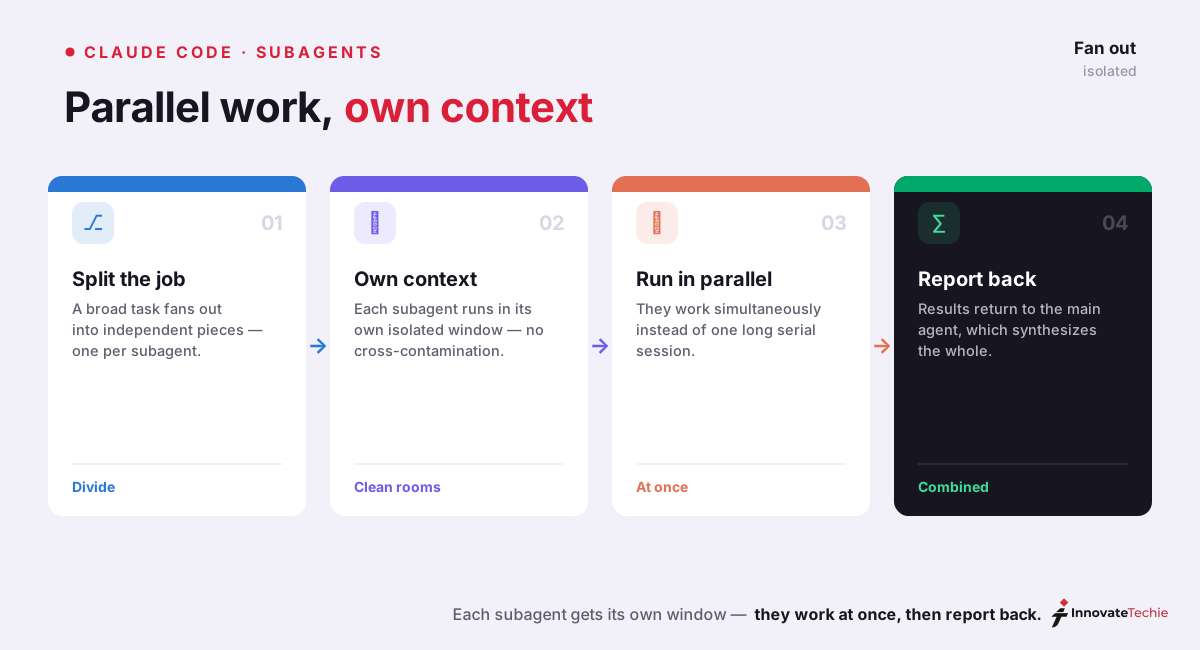
8 sectionsClaude Code subagents are named, isolated Claude instances that each run in their own context window with a custom system prompt, tool access, and permissions. The main session delegates a task to one, it works independently, and only its final summary returns — keeping searches, logs, and file contents out of your main conversation.
We run this whole site through Claude Code, and Claude Code subagents are the feature that changed how we handle anything bigger than a single file. Instead of one long conversation that slowly clogs with search output and half-read logs, we hand the messy parts to workers that run off to the side and report back a clean answer. Here is how Claude Code subagents actually work, when they earn their keep, and how to build your own.
What are Claude Code subagents?
A subagent is a second Claude, spun up by your main session to do one job. Anthropic's subagents documentation describes each one as running in its own context window with a custom system prompt, specific tool access, and independent permissions. Claude reads the subagent's description, decides a task matches, delegates it, and waits for the summary.
Claude Code ships with a few built-in subagents you are probably already using without noticing:
- Explore searches and reads the codebase to answer "how does this work?" without touching anything, and keeps all that reading out of your main context.
- Plan drafts an implementation plan the same way — read-only, isolated, fast.
- general-purpose is the catch-all worker Claude delegates open-ended tasks to.
Beyond those, you can define custom subagents with their own prompts, tool restrictions, and model. That is where the real payoff sits. If you are brand new to the tool, start with our pillar guide, What Is Claude Code?, then come back — the rest of this assumes you have a session running.
Subagents vs. one big session
The instinct when a task gets large is to keep piping everything into one conversation. That is exactly what fills a context window with material you will never reference again: forty file reads to answer one question, a wall of test output, a log dump. Once that noise is in context, it stays, and it degrades every later answer.
Claude Code subagents fix this by isolation. The subagent does the forty reads in its window, and only the two-sentence conclusion comes back to yours. Anthropic's engineering write-up on subagents puts the trigger plainly: reach for one when a task touches ten or more files, splits into three or more independent pieces of work, or would otherwise flood the main thread. A subagent also gives you a genuinely fresh perspective — a reviewer with no memory of the conversation that produced the code reviews it more honestly. For the mechanics of why this matters, our context window explainer walks through how quickly a window fills and why keeping it clean is worth the effort.
When Claude Code subagents help
Not every task wants a subagent. The overhead of spinning one up only pays off when the work is bulky, independent, or noisy. These are the cases where we reach for them by default:
| Use case | Why a subagent fits | How we trigger it |
|---|---|---|
| Broad code review | A reviewer with no conversation history is less biased and keeps the diff out of context | "Review these files in separate subagents, one concern each" |
| Fan-out research | Independent questions run at once instead of one after another | "Research these five modules in parallel using subagents" |
| Large migration or refactor | Each file or package is isolated work; failures don't poison the batch | "Migrate each route in its own subagent, report blockers" |
| Dependency upgrade | Reading changelogs and testing is high-volume, low-reference | "Check each package's breaking changes in a subagent" |
| Test writing | Generating tests per module is embarrassingly parallel | "Write tests for each service in parallel" |
The common thread: the work would otherwise dump a lot of intermediate material into your main window, and the pieces don't depend on each other. When both are true, Claude Code subagents are almost always the right call.
Claude subagent setup: defining your own
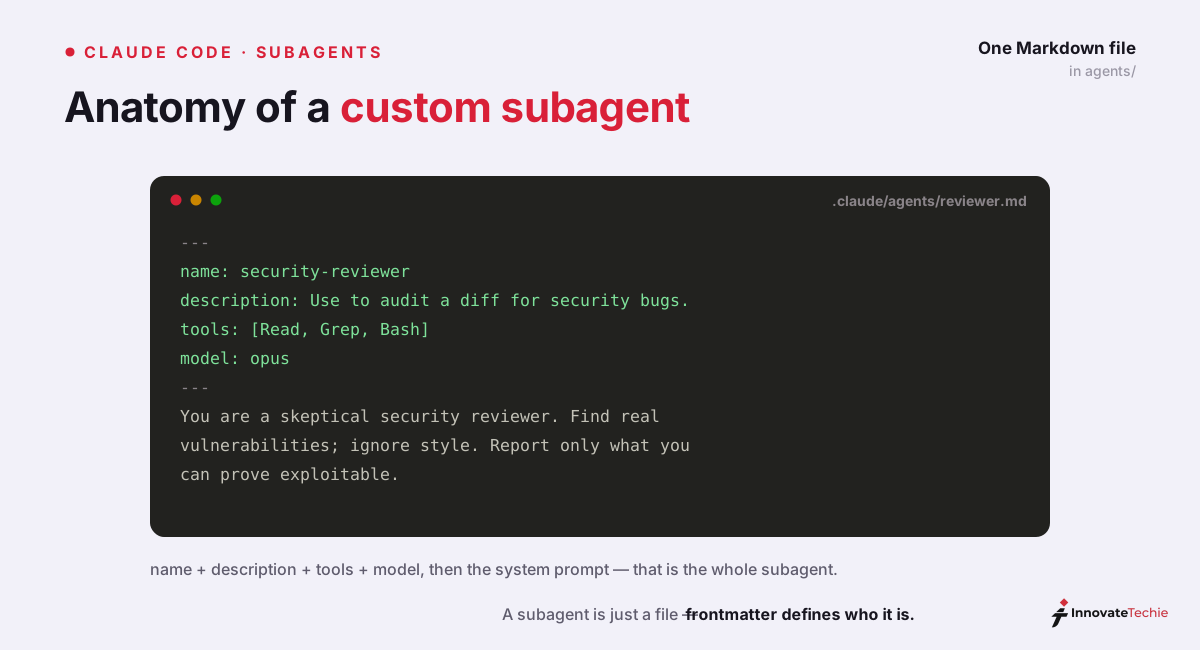
A custom subagent is a Markdown file with YAML frontmatter, and the whole claude subagent setup takes about two minutes. Note that as of recent releases the /agents command no longer opens an interactive wizard — it just reminds you to ask Claude to write the file or edit one yourself. Both paths land in the same place.
Files live in one of two folders. Project subagents go in .claude/agents/ at the repo root, travel with the codebase via git, and are ideal for team-shared specialists. User subagents go in ~/.claude/agents/ and follow you across every project. When two share a name, the project version wins.
The file itself is short:
---
name: security-reviewer
description: Review a diff for security issues — injection, auth gaps, secret leaks. Use when the user asks for a security review.
tools: Read, Glob, Grep
model: sonnet
---

# Security reviewer

1. Read only the changed files and their direct callers.
2. Flag injection, broken auth, and leaked secrets — nothing stylistic.
3. Return findings ranked by severity, with file and line. No fixes.
Only name and description are required. Everything else tunes behavior:
| Field | Required | What it controls |
|---|---|---|
name | Yes | How you and Claude refer to the subagent |
description | Yes | The routing rule Claude uses to decide when to delegate |
tools | No | Which tools it may use; inherits all if omitted |
disallowedTools | No | Tools to strip from the inherited or listed set |
model | No | sonnet, opus, haiku, a full model ID, or inherit (default) |
skills | No | Skills to preload into the subagent's context at startup |
The description is the field people get wrong: it is a routing rule, not documentation. Name the requests it should handle in plain language, the same way a good Claude Code skill description reads. Restart the session after creating a brand-new agents/ folder — a running session won't detect a directory that didn't exist at startup. For the full command reference, our Claude Code CLI documentation guide covers the flags around agents and permissions.
Running parallel agents in Claude Code
Claude Code subagents run one at a time by default; the trick to parallelism is being explicit. When we want fan-out, we say so directly — "research the auth, database, and API modules in parallel using separate subagents" — and Claude dispatches them together instead of in sequence. Vague prompts get sequential work; explicit ones get parallel agents in Claude Code.
Behind the scenes, Claude Code runs up to about ten subagents concurrently and queues the rest, feeding new ones in as slots free up. Each returns only its summary, so ten workers reading a hundred files between them still cost your main conversation just ten short reports. It is the closest thing the tool has to a speed multiplier on research-heavy work, and it is the single biggest reason we lean on Claude Code subagents for anything that fans out.
Claude Code agent teams and shared task lists
Subagents live and die inside one session and can't talk to each other. When you need workers that do coordinate — passing state, sharing a task list, dividing a long project — that is a different feature. Claude Code agent teams give each teammate its own independent context and a shared list to pull work from, so several agents chip away at one backlog together. For many fully independent sessions you monitor from one place, background agents fit better. The three tiers stack like this:
| Feature | Isolation | Coordination | Best for |
|---|---|---|---|
| Subagents | Own context, one session | None — only summaries return | Fan-out research, reviews, migrations |
| Agent teams | Own context per teammate | Shared task list, cross-talk | Long multi-part projects |
| Background agents | Fully separate sessions | Monitored from one view | Many unrelated jobs at once |
Most days, plain Claude Code subagents are all you need. Reach up a tier only when the work genuinely has to be split across communicating workers, because each tier adds coordination overhead you pay for whether you use it or not.
The cost trade-offs
Subagents are not free tokens. They save your main context — only summaries return — but each worker runs a full agent loop of its own, so fanning ten of them out can burn more total tokens than doing the work inline, even as your main window stays clean. That trade is usually worth it for speed and clarity, but it is a trade.
The lever that keeps Claude Code subagents cheap is the model field. A subagent that only greps and reads files does not need your top-tier model, so route it to Haiku and pay a fraction. We reserve the expensive models for work that needs judgment:
| Task type | Suggested model | Why |
|---|---|---|
| Codebase search and file reading | model: haiku | Fast, cheap, mostly mechanical |
| Routine refactor across files | model: sonnet | Balanced quality and cost |
| Deep architectural review | model: opus or inherit | Judgment outweighs token price |
If you are unsure which tier fits, our Claude Haiku vs Sonnet comparison breaks down where each model earns its cost. Subagents have been part of Claude Code since the 2.x releases, and the behavior described here matches the current CLI.
According to Anthropic's Claude Code documentation, subagents each run in their own isolated context window, and in our own broad-review workflows we routinely fan out 10 or more at once on models up to Opus 4.8.
Claude pricing at a glance
| Plan | Price |
|---|---|
| Free | $0 |
| Pro | $20 / month |
| Max | from $100 / month |
| API | Pay per token |
For the full breakdown of every plan, see our how much Claude costs guide.
Frequently Asked Questions

Written by
InnovateTechie
Writing about Claude and the Anthropic toolkit — models, Claude Code, pricing, features, and fixes, in clear, practical, hands-on guides tested by daily use.
View all posts →