




Part ofWhat Is Claude Code? The Complete Guide
The Claude Code statusline puts model, context and cost in your terminal. Setup in settings.json, custom scripts and recipes worth copying.
In This Article
7 sectionsThe statusline in Claude Code is a configurable bar pinned to the bottom of the CLI that shows whatever a script you point at it prints: model, context usage, session cost, git branch. Turn it on by adding a statusLine command to ~/.claude/settings.json, or run /statusline and describe the bar you want in plain English.
We run this site with Claude Code daily, and the Claude Code statusline is the first thing we set up on any new machine — we lost too many sessions to surprise compactions before we kept context usage on screen. Below: what the bar can show, both ways to enable it, a script you can copy, the prebuilt options, and the fixes for a blank bar. New to the agent itself? Start with our pillar guide, What Is Claude Code?, then come back.
What the statusline in Claude Code shows
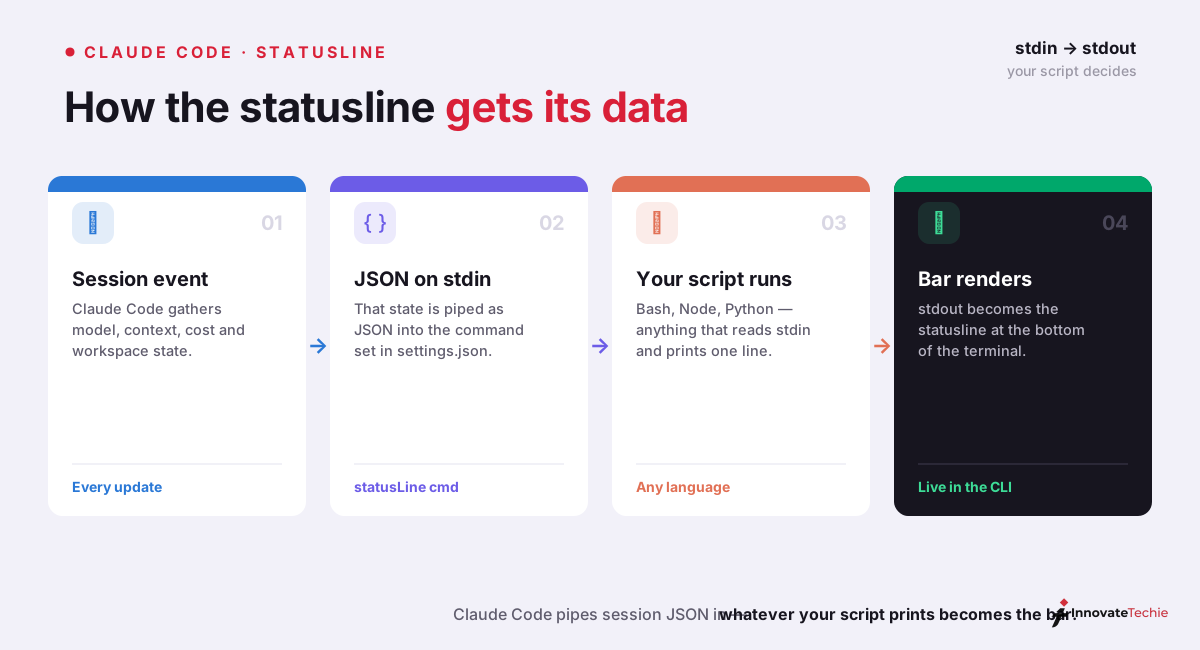
Nothing, at first — the bar stays empty until you configure it. Once you do, Claude Code pipes a JSON snapshot of the live session to your command on every update and renders whatever the command prints to stdout in a row above the built-in footer. Think of it as the VS Code status bar, except every segment is a line of shell you control.
The JSON carries more than most people expect. These are the fields we reach for:
| Field | What you get |
|---|---|
model.display_name, model.id | Active model — Opus with id claude-opus-4-8, for example |
context_window.used_percentage | Precomputed share of the context window consumed (input plus cache tokens) |
context_window.context_window_size | 200,000 tokens by default; 1,000,000 on extended-context models |
cost.total_cost_usd, cost.total_duration_ms | Estimated session spend and wall-clock duration |
cost.total_lines_added, cost.total_lines_removed | Code churn for the session |
workspace.current_dir, workspace.project_dir | Where you are now versus where you launched |
rate_limits.five_hour, rate_limits.seven_day | Subscription quota used — Pro and Max sessions only |
session_id, version, vim.mode, agent.name | Session identity and UI state for everything else |
Two details trip people up. First, cost.total_cost_usd is a client-side estimate — good for pacing yourself, not invoice-exact. Second, the git branch is not in the JSON: your script asks git directly, which is why every example below shells out to git branch --show-current. And if you're unsure why that context percentage deserves permanent screen space, our Claude context window guide shows what degrades as it fills.
Claude Code statusline config: two ways to turn it on
The fast path is the /statusline command. Type it in a session, describe the result in natural language — /statusline show model, git branch, and a context bar that goes red past 80% — and Claude Code writes the script into ~/.claude/, makes it executable, and adds the settings entry itself. We use it for a first draft, then hand-edit.
The manual path is a statusLine block in your settings file. Anthropic documents every stdin field, with bash, Python, and Node.js examples, in the official statusline reference; the minimal working config is four lines:
{
  "statusLine": {
    "type": "command",
    "command": "~/.claude/statusline.sh",
    "padding": 0
  }
}
Five keys cover the whole Claude Code statusline config surface:
| Key | Purpose | Default |
|---|---|---|
type | Always "command" — the bar runs a shell command | required |
command | Script path or inline shell; receives session JSON on stdin | required |
padding | Extra horizontal spacing, in characters | 0 |
refreshInterval | Also re-run every N seconds (minimum 1) for clock-style segments | unset |
hideVimModeIndicator | Hide the built-in -- INSERT -- text when your script prints vim mode itself | false |
You don't even need a script file. The command string runs in a shell, so an inline jq one-liner is a complete configuration:
{
  "statusLine": {
    "type": "command",
    "command": "jq -r '\"[\\(.model.display_name)] \\(.context_window.used_percentage // 0)% context\"'"
  }
}
Like Claude Code skills, this is all plain files — no marketplace, no build step — and the same block placed in .claude/settings.json at a repo root gives a whole team the same bar. statusLine is one of a few dozen settings worth knowing; our Claude Code CLI documentation guide maps the rest.
Build a custom Claude Code statusline script
The contract is tiny: read one JSON object from stdin, print text to stdout. Each printed line becomes a row, and ANSI color codes work in any modern terminal. Here's the bash script we actually run, trimmed of decoration:
#!/bin/bash
input=$(cat)

MODEL=$(echo "$input" | jq -r '.model.display_name')
PCT=$(echo "$input" | jq -r '.context_window.used_percentage // 0' | cut -d. -f1)
COST=$(echo "$input" | jq -r '.cost.total_cost_usd // 0')
BRANCH=$(git branch --show-current 2>/dev/null)

printf '[%s] ctx %s%% | $%.2f%s\n' "$MODEL" "$PCT" "$COST" "${BRANCH:+ | $BRANCH}"
Save it as ~/.claude/statusline.sh, run chmod +x on it, and point the settings block above at the path. Test it before Claude Code does — echo '{"model":{"display_name":"Opus"}}' | ~/.claude/statusline.sh should print a line instantly. The // 0 fallbacks earn their keep: used_percentage is null until the first API response, and an unguarded script prints null% for the opening seconds of every session.
Timing shapes how you design segments. The script runs after each assistant message, after /compact finishes, and when permission mode or vim mode changes, debounced at 300 ms so rapid events batch into one execution. A slow script blocks the next render and gets cancelled when a fresh update lands, so cache anything expensive — git status in a large repository is the usual offender. The whole thing runs locally and consumes no API tokens.
ccusage, ccstatusline, and when not to script it
If what you want is cost telemetry, don't build it — the community already has. Point your command at ccusage, whose statusline integration reads your local usage data and prints session cost, today's total, the current five-hour billing block with time remaining, a burn rate, and the active model:
{
  "statusLine": {
    "type": "command",
    "command": "npx -y ccusage statusline",
    "padding": 0
  }
}
ccstatusline solves a different problem: appearance. It ships powerline glyphs, themes, and an interactive terminal UI where you assemble segments instead of writing shell, and Anthropic's docs also point Starship users at starship-claude. Our rough guide:
| Option | Setup | Best for |
|---|---|---|
| Custom script | Ten lines of bash plus jq | Exact control, zero dependencies, odd personal requests |
| ccusage | npx -y ccusage statusline | Cost telemetry: daily totals, billing blocks, burn rate |
| ccstatusline | Interactive TUI configurator | Powerline styling without writing any code |
We started with ccusage, kept it for a month, then went back to a custom script — the burn-rate figure was fun, but branch plus context percentage is what we glance at forty times a day.
Recipes: the segments we actually run
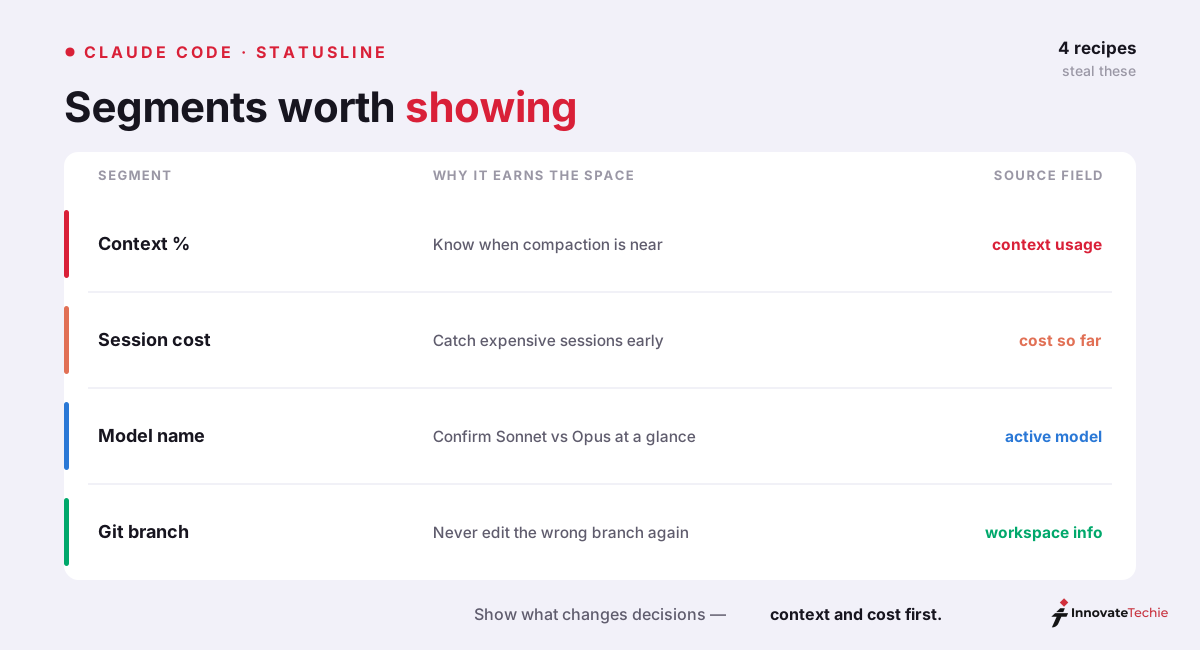
Context percentage, colored. Read context_window.used_percentage, print a ten-character block bar, switch the ANSI color yellow at 70% and red at 90%. This is the highest-value segment on the bar: when it goes red, we /compact on our own terms instead of mid-task.
Session cost. printf '$%.2f' on cost.total_cost_usd. API-billed accounts watch real spend; subscription accounts read it as an effort meter for the session.
Model and effort. Print model.display_name beside effort.level. It has caught us running Claude Opus 4.8 at max effort on README tweaks more than once — a two-second glance that pays for itself.
Rate limits. Subscriber sessions expose rate_limits.five_hour.used_percentage and a seven_day counterpart. On Claude Max plans the five-hour window is the one you bump first, and watching it climb beats the surprise lockout by a mile.
Why your Claude Code status bar is empty
A statusline in Claude Code stays blank until something is configured, so an empty bar out of the box is not a bug. If yours is configured and still blank, the causes are boringly consistent:
| Symptom | Cause | Fix |
|---|---|---|
| No bar at all | No statusLine entry — it is off by default | Run /statusline or add the settings block |
| Configured but blank | Script not executable, or printing to stderr | chmod +x the file; write to stdout only |
statusline skipped · restart to fix | Workspace trust not accepted | Restart Claude Code and accept the trust dialog |
| Worked, then vanished | disableAllHooks: true in settings | Remove the flag — it disables the statusline too |
Prints null or 0 | Fields empty before the first API response | Add fallbacks such as // 0 in jq |
| Fine in a terminal, missing in the editor panel | The extension pane does not render it | Run Claude Code in the integrated terminal |
Two sharper edges. On Windows, write the command path with forward slashes — Git Bash consumes unquoted backslashes, and the command fails with no visible error. And claude --debug logs the exit code and stderr of the first statusline invocation in a session, which turns most of this table into a thirty-second diagnosis.
The quick checklist:
- Set the statusLine command in settings.json
- Your script reads session JSON on stdin
- Whatever it prints becomes the bar
- Start with context %, cost and model
Claude pricing at a glance
| Plan | Price |
|---|---|
| Free | $0 |
| Pro | $20 / month |
| Max | from $100 / month |
| API | Pay per token |
For the full breakdown of every plan, see our how much Claude costs guide.
Frequently Asked Questions

Written by
InnovateTechie
Writing about Claude and the Anthropic toolkit — models, Claude Code, pricing, features, and fixes, in clear, practical, hands-on guides tested by daily use.
View all posts →