




Part ofWhat Is Claude Code? The Complete Guide
Claude Code MCP connects the agent to your tools, databases, and APIs through the Model Context Protocol. How MCP servers work, how to add one, and security.
In This Article
10 sectionsClaude Code MCP is how Anthropic's coding agent reaches external tools and data through the Model Context Protocol, an open standard for AI-tool integrations. An MCP server is a small program that exposes one system — a repository, database, browser, or API — as tools Claude Code can call directly. You connect one with the claude mcp add command.
We build and run this site with Claude Code every day, and MCP is the layer that turns it from a code editor into an agent that reaches the rest of our stack — GitHub, a Postgres database, a headless browser for UI checks. Below: what Claude Code MCP actually is, how to add a server, the servers worth connecting, local versus remote transports, and the security rules we never skip. New to the tool itself? Start with our pillar, What Is Claude Code?.
What is Claude Code MCP?
The Model Context Protocol Claude Code relies on is an open standard, created by Anthropic and now adopted across the industry, that defines how an AI agent discovers and calls external capabilities. It is the same protocol behind Claude Connectors on claude.ai — the wire format is shared, only the packaging differs.
A Claude Code MCP server is a program that speaks that protocol and exposes one system as a set of callable tools. Point Claude Code at a GitHub server and it gains tools to read repositories, open pull requests, and comment on issues. Point it at a Postgres server and it can inspect schemas and run read queries. The agent discovers each server's tools at startup, then calls them mid-task instead of waiting for you to paste data in.
That is the whole idea: MCP gives Claude Code hands, not just a mouth. Without a server, the agent reads and edits local files and runs shell commands — plenty for most coding. With Claude Code MCP servers connected, it acts on live systems your files never contained.
Do you actually need an MCP server?
No — Claude Code MCP is opt-in, and that trips up newcomers. Claude Code works out of the box for local code editing with zero MCP configuration. You add a server only when you catch yourself copying data from another tool into the chat: an issue tracker, a monitoring dashboard, a database console. That copy-paste tax is the signal. If everything you need already lives in the repo, skip MCP entirely and add it the day a workflow actually reaches beyond local files.
How to add an MCP server to Claude Code
The whole MCP Claude Code setup runs through one command family. There are three transports, matched to where the server runs.
Remote HTTP servers — the recommended option for cloud services. You give Claude Code a URL and its tools appear:
claude mcp add --transport http sentry https://mcp.sentry.dev/mcpLocal stdio servers — programs Claude Code launches on your machine. Everything after the -- separator is the command it runs, passed through untouched:
claude mcp add --transport stdio db -- npx -y @bytebase/dbhub \
  --dsn "postgresql://readonly:pass@localhost:5432/analytics"
That -- matters: it divides Claude's own flags (--transport, --env, --scope) from the command that starts the server. Drop it and Claude Code tries to parse the server's flags as its own. SSE is the third transport, now deprecated in favor of HTTP — use it only for older servers that require it.
Manage what you have added with three commands:
claude mcp list          # every configured server and its status
claude mcp get github    # details for one server
claude mcp remove sentry # drop a server
Inside a session, /mcp shows live connection status and runs the OAuth sign-in for servers that need it. The full flag reference lives in Anthropic's Claude Code MCP documentation, and our own Claude Code CLI documentation covers the surrounding commands.
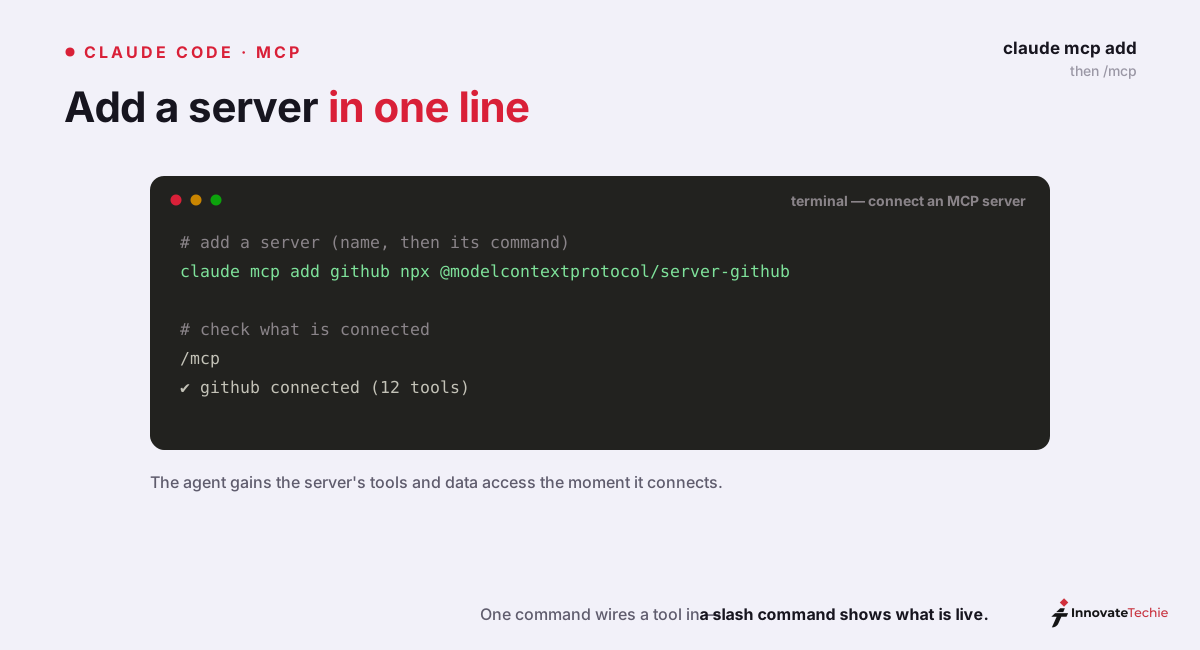
You can also write config as JSON. A project-scoped server lands in a .mcp.json file at the repo root that your whole team shares:
{
  "mcpServers": {
    "sentry": {
      "type": "http",
      "url": "https://mcp.sentry.dev/mcp"
    }
  }
}
MCP scopes: local, project, and user
Where a Claude Code MCP server's config lives decides which projects see it and whether teammates inherit it. Claude Code offers three scopes, set with --scope:
| Scope | Loads in | Shared with team | Stored in |
|---|---|---|---|
| Local (default) | Current project only | No | ~/.claude.json |
| Project | Current project only | Yes, via version control | .mcp.json in repo root |
| User | All your projects | No | ~/.claude.json |
Use local for personal, credential-bearing servers you don't want in git. Use project to ship a shared toolset to the whole team — Claude Code prompts each person to approve a checked-in .mcp.json server before it runs, so a cloned repo can't silently launch code. Use user for utilities you want in every project on your machine.
Local vs remote MCP servers
The transport you pick is really a question of where the server runs and how Claude Code reaches it.
| Local (stdio) | Remote (HTTP) | |
|---|---|---|
| Runs | As a process on your machine | On a server reachable by URL |
| Claude Code | Launches the command you specify | Connects to an endpoint you name |
| Typical servers | Filesystem, databases, custom scripts | GitHub, Sentry, Notion, Stripe |
| Auth | Local env vars and credentials | OAuth 2.0 via /mcp, or a bearer header |
| Best for | Direct system access, private data | Managed SaaS with a hosted endpoint |
The rule of thumb: databases and filesystem tools run locally because they need direct machine access, while hosted products expose a remote endpoint you authenticate once. Remote servers that return 401 or 403 get flagged in /mcp so you can complete the OAuth flow, or run claude mcp login <name> from your shell.
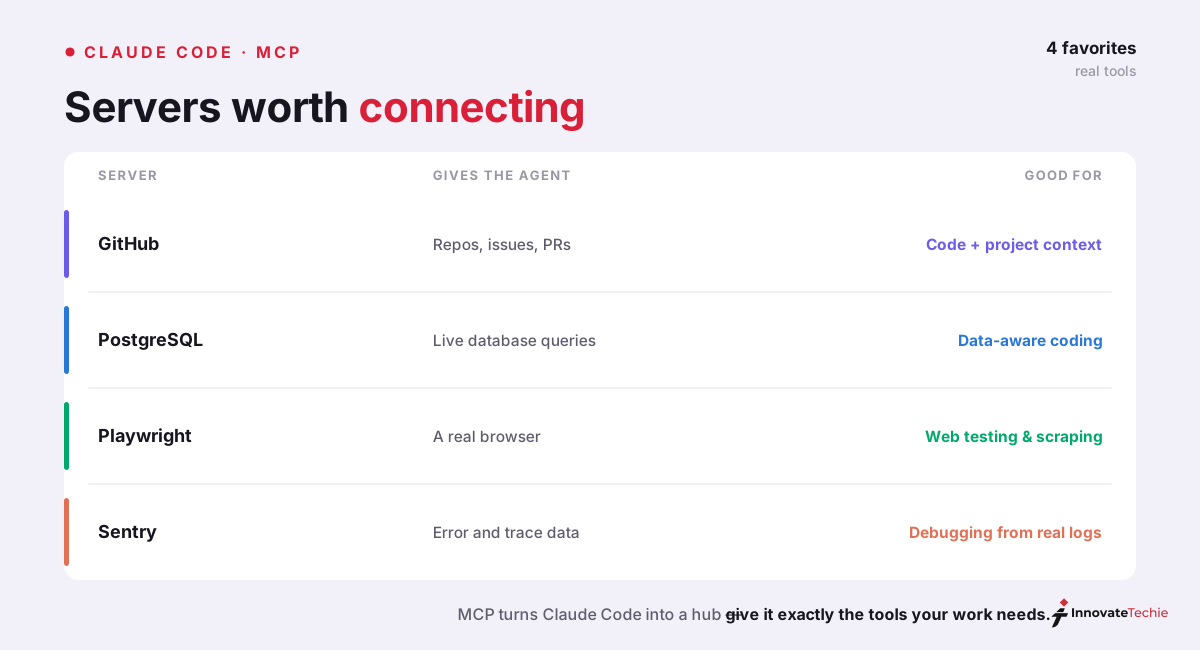
The best Claude Code MCP servers
We have wired up a couple dozen servers; these five earn permanent slots. Each row is a real, working add command.
| Server | Transport | What Claude Code can do | Add it with |
|---|---|---|---|
| Filesystem | Local | Read and write files in one chosen directory | claude mcp add filesystem -- npx -y @modelcontextprotocol/server-filesystem ~/code |
| GitHub | Remote | Repos, issues, pull requests, code review | claude mcp add --transport http github https://api.githubcopilot.com/mcp/ |
| PostgreSQL | Local | Inspect schemas and run read queries in plain English | claude mcp add --transport stdio db -- npx -y @bytebase/dbhub --dsn "..." |
| Playwright | Local | Drive a real browser to test the UI it just built | claude mcp add playwright -- npx -y @playwright/mcp@latest |
| Sentry | Remote | Pull production errors and stack traces | claude mcp add --transport http sentry https://mcp.sentry.dev/mcp |
GitHub publishes its own remote MCP server, which authenticates with a fine-grained personal access token passed as a header; once connected, "review PR #456" or "open an issue for this bug" become one-line requests. Beyond the table, the servers we reach for next are Supabase and Figma — Figma's design-to-code server needs a token with both design-access and server-config scopes, so authorize it fully before you troubleshoot a silent failure. This is a different layer from Claude Code skills, which teach the agent how to work; MCP is what it connects to.
Security: what an MCP server can actually reach
A Claude Code MCP server is code the agent executes with real access, so treat adding one like piping a script to your shell — read what you are trusting first. Three habits keep us safe:
- Vet the source. Anthropic flags this directly: a server that fetches external content can carry a prompt-injection payload that hijacks the agent. Install from official vendors and audited directories, not random gists.
- Scope the credentials. Give each server the narrowest token that works — a read-only database user, a fine-grained GitHub token limited to the repos Claude needs. A leaked or misbehaving server can only reach what its credentials allow.
- Prefer project approval for shared config. Checked-in
.mcp.jsonservers stay pending until each teammate approves them, so a malicious pull request can't wire in a server that runs on the nextclaudelaunch.
MCP inherits the permissions of whatever credentials you hand it — no more, no less. The risk is never that MCP grants extra access; it is that a compromised server abuses the access you already granted.
When a Claude Code MCP server won't connect
Most Claude Code MCP connection failures fall into a short list of causes. Run /doctor and claude mcp list first to see each server's status, then match the symptom:
| Symptom | Likely cause | Fix |
|---|---|---|
Server marked failed in /mcp | Stripped environment — .bashrc/.zshrc PATH entries aren't loaded | Use absolute paths in the command, or point at the full binary |
npx server fails on Windows | .cmd shims need a shell to launch | Wrap the call: -- cmd /c npx -y <package> |
| Server never connects at all | Claude Code launched from a path with spaces or special characters | Move the project to a clean path and relaunch |
| Remote server returns 401/403 | Not authenticated yet | Run /mcp, or claude mcp login <name>, and complete the OAuth flow |
The Windows fix catches nearly everyone: invoking npx directly fails because .cmd files need a shell, so the cmd /c wrapper is mandatory on native Windows (WSL behaves like Linux and doesn't need it).
Claude Code as an MCP server
The relationship runs both ways. claude mcp serve exposes Claude Code's own file-editing and command-execution tools over MCP, so another client — Claude Desktop, Cursor, or Windsurf — can invoke Claude Code and delegate work to it. It is a niche but genuinely useful capability when you want one agent orchestrating another.
Claude pricing at a glance
| Plan | Price |
|---|---|
| Free | $0 |
| Pro | $20 / month |
| Max | from $100 / month |
| API | Pay per token |
For the full breakdown of every plan, see our how much Claude costs guide.
Frequently Asked Questions

Written by
InnovateTechie
Writing about Claude and the Anthropic toolkit — models, Claude Code, pricing, features, and fixes, in clear, practical, hands-on guides tested by daily use.
View all posts →