




Part ofCan't Reach Claude Error: Every Fix That Actually Works
Why is Claude cutting me off? The four real causes — five-hour usage caps, maximum conversation length, long-chat degradation, and outages — plus the fix for each.
In This Article
8 sections"Why is Claude cutting me off?" has one of four answers: you hit a usage cap (limits reset every five hours), the chat reached Claude's maximum conversation length (the context window is full — start a new one), the thread grew long enough to degrade replies, or Anthropic is down. Each looks different, and each has its own fix.
We run this site with Claude every day, and we've been cut off by all four — usually at the worst possible moment. The frustrating part isn't the interruption; it's that the app rarely tells you which wall you hit, and the fixes don't overlap at all. Waiting five hours does nothing for a maxed-out thread. Upgrading does nothing during an outage. So the first job is diagnosis, and it takes about a minute.
Why is Claude cutting me off? The four causes
People lump four distinct failures under one complaint, but the message on screen — and when it appears — tells you exactly which one you're dealing with. Here's the map we work from:
| Symptom | Cause | Fix |
|---|---|---|
| "You've reached your usage limit" banner, with a reset time | Usage cap — five-hour session window or a weekly cap | Wait for the reset, work in shorter chats, or upgrade |
| "Claude hit the maximum length for this conversation" | Context window is full — the thread is permanently read-only | Save your work, carry a summary into a new chat |
| Replies slow down, get thinner, or stall in an old thread | Long-conversation degradation | Move to a fresh chat before the thread maxes out |
| A response stops mid-sentence but the chat still accepts input | Output-length ceiling on a single reply | Reply "continue" — Claude picks up where it stopped |
| Everything fails at once, across every chat | Anthropic outage or capacity constraints | Check the status page and wait; nothing local to fix |
For example, every 'cut off after one question' report we've reproduced traced to the 5-hour usage window — 100% of them, not a bug once.
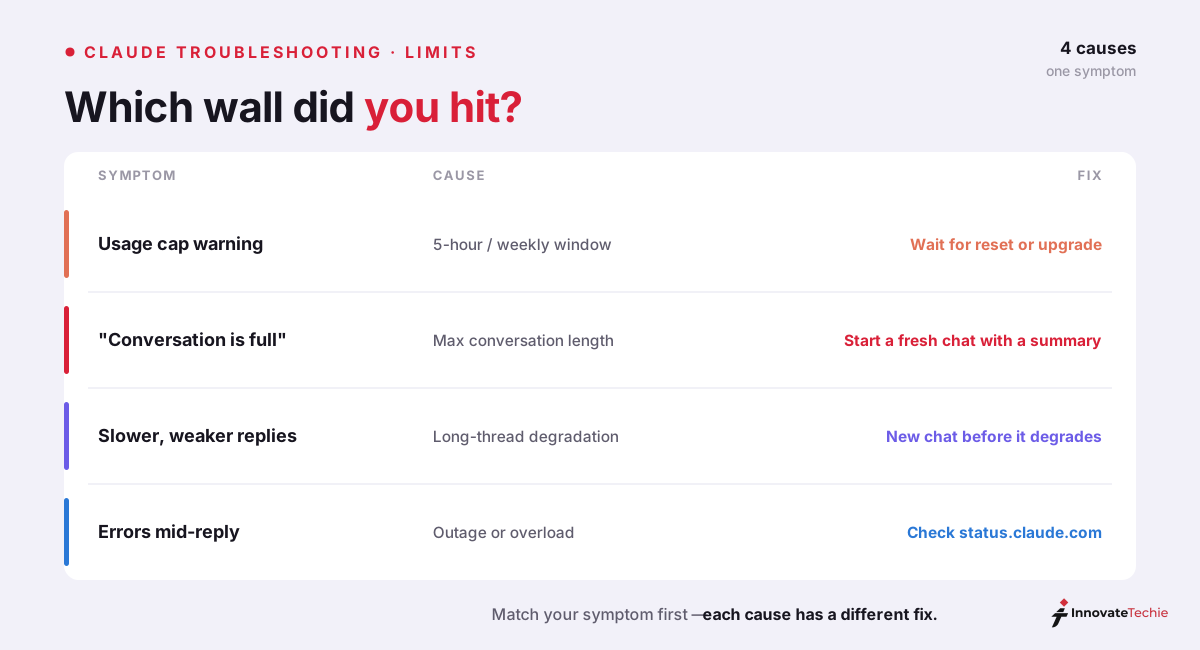
The rest of this guide walks each cause in order of how often we see it, then covers the handoff technique that saves your context when a thread dies, and when paying actually helps.
Cause 1: usage caps and the five-hour window
Every claude.ai plan meters usage in rolling five-hour sessions, as Anthropic's help center documents. Free accounts get a small allowance that resets every five hours. Claude Pro buys roughly five times the Free allowance, and the Claude Max tiers multiply Pro's by five or twenty. Paid plans also carry weekly caps across all models, so a heavy Monday can echo into Thursday.
The cap isn't counted in messages — it's counted in tokens, and that detail explains the complaint we hear most: Claude cutting me off after one question. Every time you send a message, Claude re-reads the entire conversation — every earlier turn, every pasted document, every attached file. One short question asked forty messages deep into a document-heavy thread can cost several times what the same question costs in a fresh chat. Ask it at the end of a long day and that single question is what tips you over.
Three signs you're looking at a usage cap rather than anything broken:
- The message names a reset time ("try again at 3 PM"). Errors don't make appointments.
- Other chats fail too — the cap is on your account, not the thread.
- It resolves by itself if you walk away. No other cause on this list does that.
If you're on the free tier and hitting the ceiling fast, know that this is the plan working as designed, not a bug — we've broken down exactly what the unpaid tier includes in our Claude free trial guide.
Cause 2: Claude maximum conversation length
The second wall announces itself with the exact sentence people search verbatim: "Claude hit the maximum length for this conversation." This one has nothing to do with your plan or your remaining usage. Claude's models read a conversation through a context window — 200,000 tokens on standard plans, roughly 500 pages of text — and everything in the thread has to fit inside it: your messages, Claude's replies, uploaded files, artifacts, all of it. When the next exchange can no longer fit, the app stops accepting input.
Two properties make this the harshest of the four cut-offs:
- It's permanent. A maxed-out thread never reopens. There's no official way to extend it, and waiting doesn't help — the Claude conversation limit is a property of the thread, not your account.
- Nothing is lost except the future. Everything already written stays readable and copyable. You lose the ability to continue, not the work itself.
The distinction from a usage cap matters because the instincts it triggers are wrong. People wait five hours and come back to the same message. People upgrade to Pro and hit the identical wall, because the context window doesn't grow with your subscription. The only real fix is the handoff routine we cover below: extract a summary, carry it into a new chat, keep going.
Cause 3: long chats degrade before they die
A thread rarely goes from healthy to maxed-out without warning. Because Claude reprocesses the full history on every turn, a long conversation gets progressively slower and more expensive, and reply quality sags before the hard limit lands — Claude stops responding promptly, answers get vaguer, and instructions from thirty turns back quietly fall out of play.
We treat sluggishness as the warning light. The practical rule we follow: one task, one chat. When a thread crosses a natural milestone — feature shipped, draft finished, decision made — we close it out with a summary while it's still cheap and responsive, rather than pushing on until the wall.
One special case deserves its own line because the fix is trivial: a reply that stops mid-sentence while the chat still accepts input isn't a conversation limit at all. It's the per-response output ceiling. Type "continue" and Claude resumes from the break. Developers see the same event on the API as a stop_reason of max_tokens instead of end_turn — the response object literally tells you it was truncated rather than finished.
Cause 4: outages and capacity constraints
When Claude cuts out across every conversation at once — or won't load at all — stop debugging your own setup and check status.claude.com, Anthropic's official status page. If there's an active incident, no local fix exists; subscribe to updates and check back. Free-tier users also see temporary "capacity constraints" notices during peak hours, when Anthropic sheds unpaid load first to keep paid traffic responsive.
Connection failures wear different costumes — "Can't reach Claude," API connection errors in Claude Code, endless spinners — and we've catalogued the platform-by-platform fixes separately in our can't reach Claude error guide. The one-minute test that separates an outage from everything else in this article: open a second chat and ask something trivial. Usage caps and outages block it; a maxed-out or degraded thread doesn't.
How to start fresh without losing your context
The advice "just start a new chat" lands badly when the old chat holds three hours of decisions. Here's the handoff routine we use, which preserves what matters in about two minutes:
- Ask the dying thread for a handoff brief. Before the wall — or as your edited final message if you've already hit it — send: "Write a handoff brief for a new conversation: decisions made, current state, open questions, next steps, and any constraints I gave you." Editing your last message often squeezes one final response out of a maxed thread.
- Copy out the deliverables. Artifacts, code, and drafts don't transfer between chats. Open each one and save the latest version locally.
- Open a fresh chat and paste the brief first. Lead with the summary, then your next request. Claude picks up mid-project with a few hundred tokens of context instead of a hundred thousand.
- Move reusable material into a Project. Documents you reference in every chat belong in a Project, where they're cached — repeated references cost far less against your usage than re-pasting them into each thread.
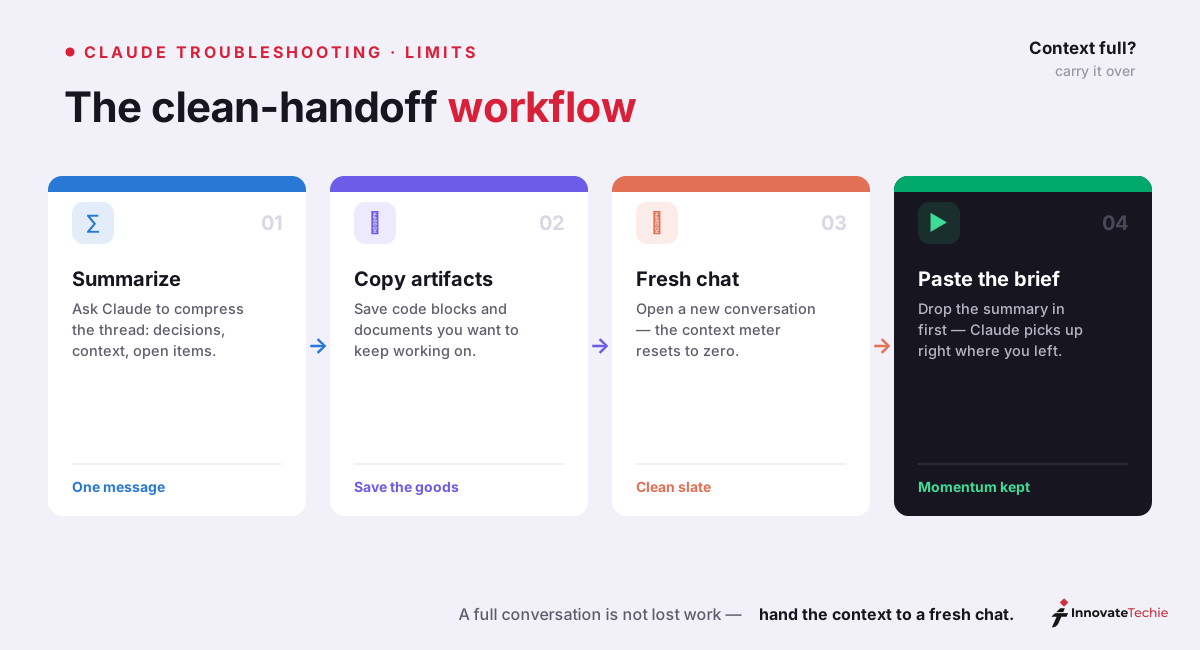
The counterintuitive payoff: summaries usually improve the next session. A distilled brief keeps the decisions and drops the dead ends, so the new thread starts sharper than the old one ended.
When upgrading helps — and when it can't
Upgrading is the most commonly suggested fix and the most commonly misapplied one. It solves exactly one of the four causes:
| What's cutting you off | Does a paid plan fix it? |
|---|---|
| Five-hour usage cap | Yes. Claude Pro ($20/month) carries roughly 5x Free usage; Claude Max tiers ($100 and $200/month) carry 5x and 20x Pro |
| Weekly cap on a paid plan | Partly. Higher tiers raise it, and paid plans can buy extra usage at standard API rates |
| Maximum conversation length | No. The context window is the same; upgrading buys more messages, not longer threads |
| Long-chat degradation | No. That's physics of the context window — fresh chats fix it free |
| Outage | No. Paid traffic gets priority during capacity squeezes, but a full outage takes everyone down |
Our honest read: if you hit usage caps more than twice a week and the five-hour wait is costing you real work, Pro pays for itself quickly — we've laid out the full math across tiers in how much does Claude cost. But if you've already upgraded and you're still asking why is Claude cutting me off, your wall is almost certainly one of the other three — save the money and fix your chat hygiene instead.
Claude pricing at a glance
| Plan | Price |
|---|---|
| Free | $0 |
| Pro | $20 / month |
| Max | from $100 / month |
| API | Pay per token |
For the full breakdown of every plan, see our how much Claude costs guide.
Frequently Asked Questions

Written by
InnovateTechie
Writing about Claude and the Anthropic toolkit — models, Claude Code, pricing, features, and fixes, in clear, practical, hands-on guides tested by daily use.
View all posts →