




Part ofClaude AI Features: The Complete Overview
How students use Claude for studying ethically — summarizing readings, building study guides and flashcards, essay feedback, practice questions, and free access.
In This Article
8 sectionsClaude for students works best as a tutor, not a ghostwriter: use it to summarize dense readings, turn notes into study guides and flashcards, explain concepts you're stuck on, and generate practice questions before an exam. It gives feedback on your essays and outlines — but writing that you submit as your own crosses into academic misconduct.
We use Claude every day to run this site, and the same habits that make it a good work assistant make it a genuinely good study partner — with one asterisk we'll keep returning to. People search "claude ai for students" expecting a magic homework button; the reality is more useful and more boring. This is the practical guide to Claude for students: the study moves that actually work, the academic-integrity line you shouldn't cross, how citations trip people up, and where the real free access comes from. For the wider picture of what the assistant can do, start with Claude AI features.
Is Claude good for students? What it does well
So, is Claude good for students? For most coursework, yes — with limits worth naming up front. Claude, the assistant Anthropic builds, is strong at exactly the language work school demands: compressing a 40-page reading into a one-page summary, explaining a proof three different ways until one clicks, and rewriting a clumsy paragraph without flattening your voice. Its large context window means you can paste an entire lecture transcript or a full chapter and it keeps all of it in view at once.
Where it stops matters as much as where it shines, and it's the part most guides to Claude for students gloss over. Claude cannot verify a fact, so it will state a wrong date with total confidence. It invents citations that look real and aren't — the single biggest trap in Claude for students, and we come back to it below. And it does not generate images, so diagrams, graphs, and lab figures are still on you. Treat it as a brilliant, tireless teaching assistant that is occasionally, fluently wrong.
How students use Claude for studying
The core of Claude for students is a handful of repeatable moves. If you're brand new to the assistant, our walkthrough on how to use Claude AI covers the basics; here we go straight to the study workflows. In Anthropic's own study of how university students use Claude, the heaviest uses were exactly these: creating and editing study material, and getting technical concepts explained.
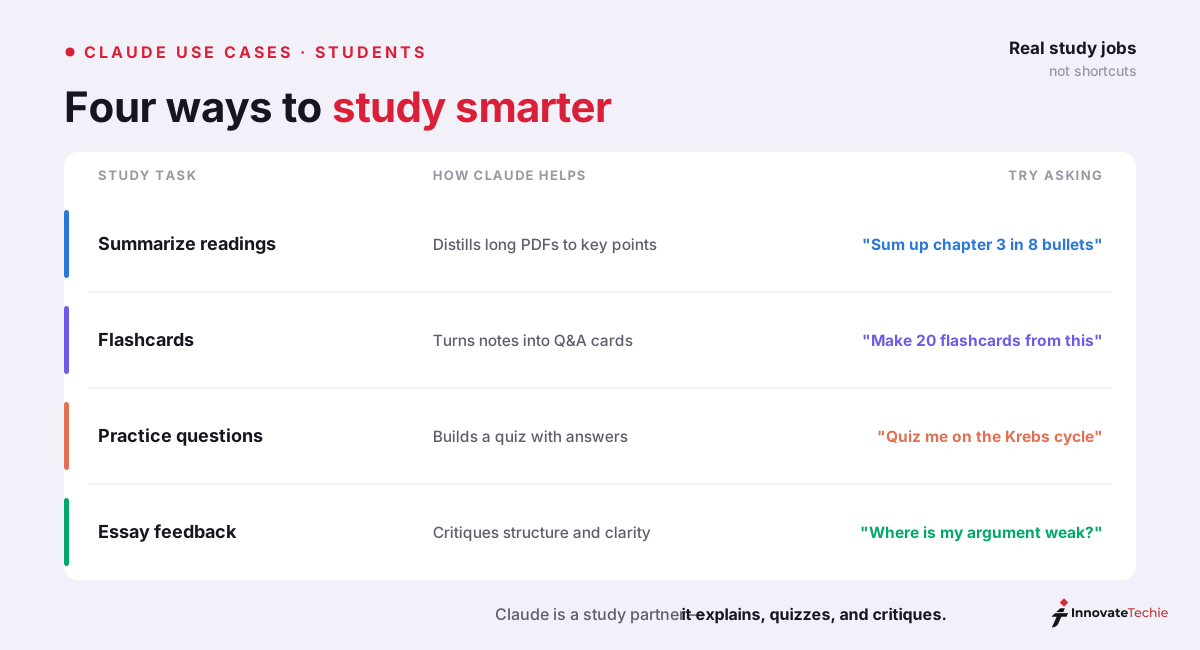
Here is the use-case table we hand to friends who ask how to start with Claude for studying:
| Study task | How to ask Claude | What to double-check |
|---|---|---|
| Summarize a reading | "Summarize this chapter in 200 words, then list its 5 key arguments." | Compare against the source; Claude can drop nuance |
| Build a study guide | "Turn my lecture notes into a study guide grouped by theme, with definitions." | Fill gaps from your notes; verify each definition |
| Make flashcards | "Create 20 Q&A flashcards from this material as CSV I can import to Anki." | Spot-check facts before you drill them in |
| Explain a hard concept | "Explain the Krebs cycle like I'm a first-year, then quiz me on it." | Cross-check against the textbook |
| Practice questions | "Write 10 exam-style questions on this topic, mixed difficulty, answers hidden." | Confirm the answers against course material |
| Essay feedback | "Critique my thesis and structure. Don't rewrite it — tell me what's weak." | Keep the actual writing yours |
Every row of this Claude for students workflow follows one rule: Claude does the scaffolding, you do the thinking the assignment is meant to measure. That split is what keeps the whole thing on the right side of the line.
The academic-integrity line: study tool vs. cheating
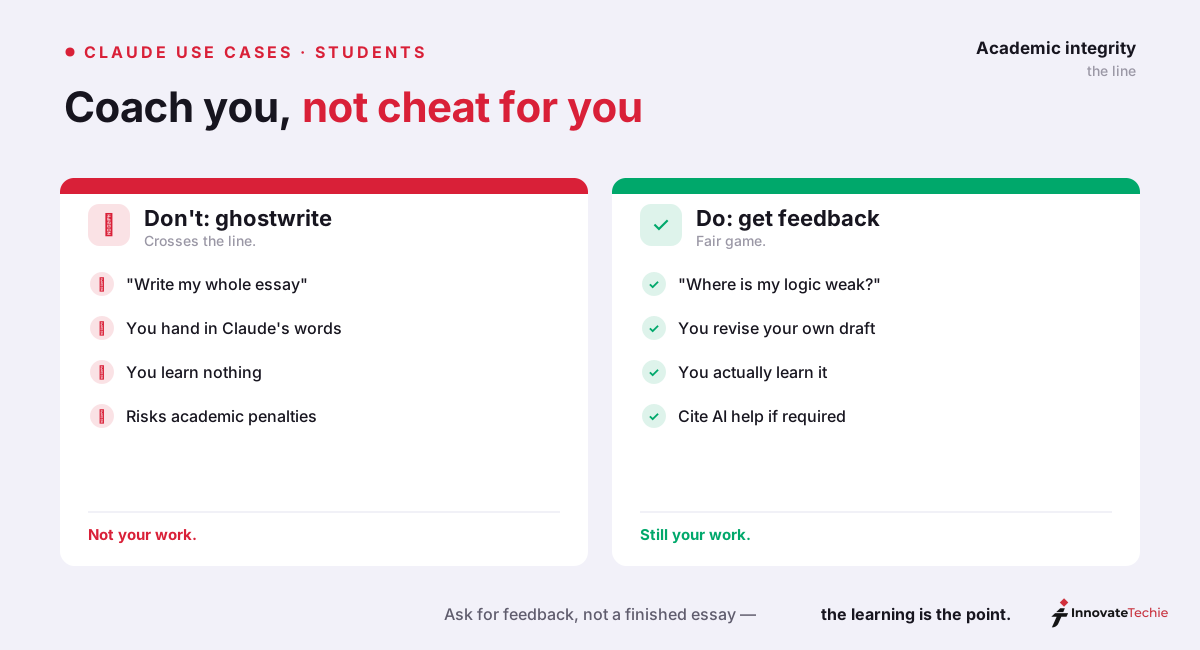
Here's the honest note the deals-sites skip. The promise of Claude for students falls apart the moment you use it to produce the graded output instead of to understand the material. Understanding, feedback, and explanation are fair game. Submitting Claude's words as your own is misconduct. Where exactly the line sits varies by school, but the shape is consistent:
| Fair game (study tool) | Over the line (misconduct) |
|---|---|
| Asking Claude to explain a concept | Pasting a take-home question and submitting its answer |
| Getting feedback on your own draft | Having Claude write the essay you turn in |
| Generating practice questions to drill | Using Claude during a closed-book exam |
| Summarizing a reading to study faster | Copying that summary into a graded reading response |
| Outlining your own argument | Handing in Claude's prose as your writing |
The rule of thumb we give students: if Claude did the thinking the assignment was supposed to measure, you've crossed the line. Every institution words this differently, so the non-negotiable first step is reading your course syllabus and your school's AI policy before you start — not after you're flagged.
Claude for homework without crossing the line
"Can I use Claude for homework?" is the question we get most, and the answer is: yes, for the parts that build understanding, no for the parts that are the graded product. The trick is making Claude walk you through the process instead of handing over a finished answer. Add one line to any homework prompt — "Don't give me the answer; ask me questions until I get there myself" — and a solver becomes a tutor.
Anthropic built this behavior into Claude for Education as a Learning Mode. Instead of solving your problem, it asks "What's your first step?" and guides your reasoning with Socratic questions, which research has long linked to deeper learning than being handed the solution. You don't need the education plan to get the effect — you can prompt any Claude account to coach rather than answer. That's Claude for homework done properly: the work stays yours, the understanding gets built, and nothing lands in a submission box that you didn't reason through.
Citations: where Claude for students goes wrong
The fastest way to fail an assignment with AI is trusting a citation Claude invented. Language models generate plausible text, and a plausible-looking reference — real author, real journal, an article that never existed — is exactly the kind of thing they're good at producing. This is the one part of Claude for students where "trust but verify" isn't enough; it's verify, then verify again.
| Safe with Claude | Risky with Claude |
|---|---|
| Formatting a source you already have into APA or MLA | Asking Claude to "find sources" and trusting the list |
| Learning the rules of a citation style | Pasting its bibliography without opening each link |
| Summarizing a paper you're genuinely reading | Citing a paper you only ever saw in Claude's output |
The safe pattern is narrow but real: give Claude a source you found yourself and ask it to format the citation, or ask it to explain how a style handles edited volumes. Never let it be the librarian. If you can't click through to the actual paper, it doesn't go in your bibliography.
Essay feedback, not ghostwriting
Essays are where the ethical line gets blurriest, so here's the clean version: Claude for students is a coach, not a ghostwriter. Ask it to pressure-test your thesis, flag where your argument goes soft, suggest counter-arguments you missed, and tighten a paragraph you already wrote — then you write the rest. Claude will usually refuse to hand over a finished essay outright anyway; it's designed to guide, brainstorm, and edit rather than to produce the whole thing for you to sign.
This is Claude for students at its best — the workflow that respects the line: draft your own rough version, paste it in, and ask "Where is this weak, and why?" You get a brutally honest read on structure, evidence, and tone without ever outsourcing the sentences. For a personal statement or a scholarship essay, that feedback loop is worth more than any first draft a model could generate for you.
The student discount question
Underneath a lot of Claude for students searches is really a money question. Short version: there's no personal student discount on Claude Pro — no .edu signup, no coupon — but if your university is a Claude for Education partner, you get free premium access simply by signing in with your school email. Confirmed partners include Northeastern, Syracuse, LSE, Dartmouth, the University of Virginia, and the University of Pittsburgh, and the list keeps growing. Everyone else has the free tier, which covers a surprising amount of studying before you hit a cap, plus Claude Pro at $20 a month if you want more headroom. We map every legitimate route — and the coupon scams to skip — in our full Claude student discount guide, so we won't rehash it here.
That's the honest case for Claude for students: a fast, patient study partner across the current claude.ai apps — Claude Opus 4.8 for the hardest reasoning, Claude Sonnet and Haiku for everyday speed. Use it as a tutor, verify what it tells you, and keep your own work your own.
The quick version:
- Summarize long readings into key points
- Turn notes into flashcards and practice quizzes
- Get feedback on your draft — never a ghostwritten essay
- Cite AI help when your school requires it
For example, a student pasted a 40-page lecture PDF and asked for 15 flashcards plus a 10-question quiz — Claude produced both in under 1 minute, ready to review.
Claude pricing at a glance
| Plan | Price |
|---|---|
| Free | $0 |
| Pro | $20 / month |
| Max | from $100 / month |
| API | Pay per token |
For the full breakdown of every plan, see our how much Claude costs guide.
Frequently Asked Questions

Written by
InnovateTechie
Writing about Claude and the Anthropic toolkit — models, Claude Code, pricing, features, and fixes, in clear, practical, hands-on guides tested by daily use.
View all posts →